
Coordinates of a Point After Translation
Loading the math board and drawing, please wait…
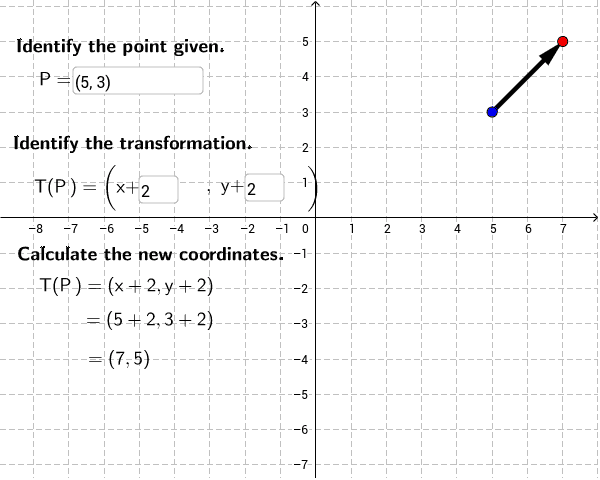
This GeoGebra example demonstrates how to find the coordinates of a point in the coordinate plane after a translation transformation. The core mathematical concepts include Cartesian coordinates, geometric translation, and vector addition. The construction utilizes GeoGebra commands like `Textfield` and `Vector`, defining points A, B, P, and vector u, along with input boxes (`inputBox1` to `inputBox3`) and text labels (`text1` to `text9`) to create an interactive learning environment. It is designed for middle and high school students learning coordinate geometry and transformation rules.
GeoGebra Commands & Parameters
Textfield(P) → inputBox1Textfield(a) → inputBox2Textfield(b) → inputBox3Vector(P, B) → u
AI Drawing Prompt Reference
Draw a coordinate plane with a point and show its new position after a translation. Start by marking the original point and displaying input boxes for its x- and y-coordinates. Also provide two input boxes for the horizontal and vertical translation components. From the original point, draw a directed segment representing the translation vector, pointing to the translated point. Use text labels to indicate the original point, the vector, and the coordinates of the translated point, clearly showing how the coordinates change to illustrate the rule of adding translation components.
The prompt above was compiled from the original drawing commands and is for reference only.