
Converting Fractions to Terminating Decimals
Loading the math board and drawing, please wait…
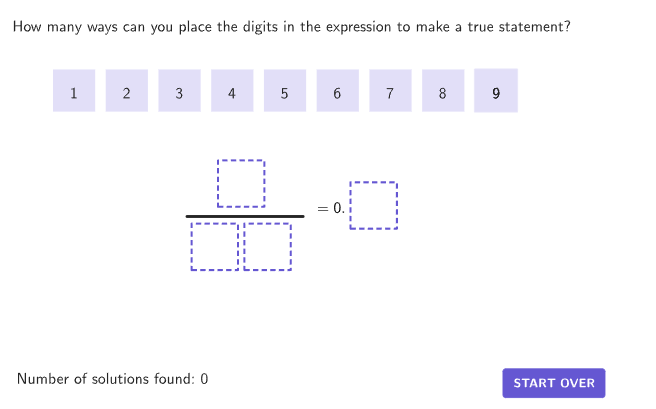
This example demonstrates how to convert fractions to terminating decimals. By creating fractions and their corresponding terminating decimals, students can explore the relationship between fractions and decimals. The activity involves GeoGebra commands such as centerBox, Zip, If, Element, Corner, Sequence, Segment, IndexOf, Flatten, and Text. Suitable for middle school grades 6-8 for understanding and applying mathematical concepts.
GeoGebra Commands & Parameters
centerBox((1.1 * boxWidth), (1.1 * boxHeight), SolnAnchor) → solnBoxZip(IsInRegion[A, solnBox], A, allPoints) → countRegion4centerBox((1.1 * boxWidth), (1.1 * boxHeight), DenomAnchor1) → boxDenom1Zip(IsInRegion[A, boxDenom1], A, allPoints) → countRegion3centerBox((1.1 * boxWidth), (1.1 * boxHeight), DenomAnchor10) → boxDenom10Zip(IsInRegion[A, boxDenom10], A, allPoints) → countRegion2centerBox((1.1 * boxWidth), (1.1 * boxHeight), NumerAnchor) → boxNumerZip(IsInRegion[A, boxNumer], A, allPoints) → countRegion1If(countEntries ≟ {1, 1, 1, 1}, (10 * IndexOf[true, countRegion2]) + IndexOf[true, countRegion3], NaN) → studentDenomIf(countEntries ≟ {1, 1, 1, 1}, IndexOf[true, countRegion4] / 10, NaN) → studentQuotientIf(countEntries ≟ {1, 1, 1, 1}, IndexOf[true, countRegion1], NaN) → studentNumerElement({P1, P2, P3, P4, P5, P6, P7, P8, P9}, movingIndex) → PMovecenterBox(boxWidth, boxHeight, P9) → box9centerBox(boxWidth, boxHeight, P8) → box8centerBox(boxWidth, boxHeight, P7) → box7centerBox(boxWidth, boxHeight, P6) → box6centerBox(boxWidth, boxHeight, P5) → box5centerBox(boxWidth, boxHeight, P4) → box4centerBox(boxWidth, boxHeight, P3) → box3centerBox(boxWidth, boxHeight, P2) → box2centerBox(boxWidth, boxHeight, P1) → box1Corner(5) → DimsSequence(HomeAnchor + ((A * (boxWidth + spacer)), 0), A, 0, 8) → homeLocationsSegment(LinePos + (-1, 0), LinePos + (-12, 0)) → divisionLineIndexOf({studentNumer, studentDenom}, studentAnswers) → studentAnsIndexZip(makeBox[A, boxWidth, boxHeight], A, homeLocations) → boxPlaceHoldersFlatten(RemoveUndefined[Zip[If[IsInRegion[PMove, Element[{box1, box2, box3, box4, box5, box6, box7, box8, box9}, A]] ∧ A ≠ movingIndex, {B, A}], A, destinationOrder, B, {1, 2, 3, 4, 5, 6, 7, 8, 9}]]) → overlapInfoZip(Text[("" * A), B, true, true, 0, 0], A, {1, 2, 3, 4, 5, 6, 7, 8, 9}, B, {P1, P2, P3, P4, P5, P6, P7, P8, P9}) → digitTextcenterBox(boxWidth, boxHeight, PMove) → highlightBoxText(("" * movingIndex), PMove, true, true, 0, 0) → highlightLblText(("" * movingIndex), PMove, true, true, 0, 0) → highlightLabelIndexOf(true, Zip[IsInRegion[PMove, A], A, {boxNumer, boxDenom10, boxDenom1, solnBox}]) → locationPMoveElement({boxNumer, boxDenom10, boxDenom1, solnBox}, locationPMove) → highlightFrameSequence(Zip[Length[destinationAnchors(A) - B] < 0.1, B, {P1, P2, P3, P4, P5, P6, P7, P8, P9}], A, 1, 4) → findPlacedPoints
AI Drawing Prompt Reference
The graphic consists of multiple rectangular boxes representing denominators, numerators, and the final solution. Numbers are displayed inside the boxes, with point markers outside. A horizontal line segment and text labels are included to show the correspondence between fractions and decimals. The construction order is: first draw the boxes, then place point markers, then add the line segment and text labels, and finally adjust positions to ensure clear correspondence.
The prompt above was compiled from the original drawing commands and is for reference only.