
Converting Decimals to Fractions
Loading the math board and drawing, please wait…
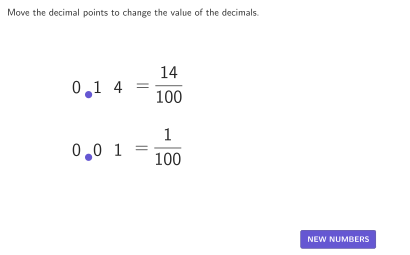
This example demonstrates how to convert decimals (up to the hundredths place) to fractions. By changing the position of the decimal point, explore the relationship between decimals and fractions. Use GeoGebra commands such as Point and Sequence for construction. Suitable for 4-5 grade students to learn about converting and comparing decimals to fractions.
GeoGebra Commands & Parameters
Point(slots1) → Point1IndexOf(Point1, slots1) → posPoint1Shuffle(Sequence[11, 99] \ Sequence[(10 * n), n, 1, 9]) → randomList1, {33, 14, 36, 38, 24, 96, 94, 18, 19, 47, 61, 12, 11, 35, 65, 34, 28, 86, 57, 52, 69, 63, 99, 16, 97, 37, 39, 25, 98, 46, 42, 51, 17, 26, 89, 85, 56, 54, 32, 67, 78, 31, 41, 53, 55, 62, 21, 58, 64, 13, 74, 82, 43, 66, 88, 93, 45, 84, 49, 95, 87, 77, 71, 48, 59, 76, 15, 72, 91, 83, 22, 73, 23, 79, 92, 75, 44, 29, 27, 68, 81}Point(slots2) → Point2IndexOf(Point2, slots2) → posPoint2Shuffle(Sequence[9]) → randomList2, {5, 1, 2, 6, 3, 4, 7, 8, 9}Corner(5) → AppSizeLine((0, 0), (1, 1)) → LineStyleExampleElement({altEmpty, altOneSolution, altTwoSolutions}, altIndex) → altTextSequence(Text[case1(k), Slot1a + (-1.5 + k, -0.1), true, true, 0], k, 1, 3) → case1TextSequence(Text[case2(k), Slot2a + (-1.5 + k, -0.1), true, true, 0], k, 1, 3) → case2TextPolygon(Zip[PixelsToPoint[Corner[1], Corner[3], Corner[5], CLIPBOARDmagicSTRINGA], CLIPBOARDmagicSTRINGA, {(pixelsLeft_{1}, pixelsTop_{1}), (pixelsLeft_{1}, y(Corner[5]) - pixelsBottom_{1}), Corner[5] - (pixelsRight_{1}, pixelsBottom_{1}), (x(Corner[5]) - pixelsRight_{1}, pixelsTop_{1})}]) → borderBox_{1}
AI Drawing Prompt Reference
This is a graphic showing the relationship between decimals and fractions. There is a point representing the decimal and another point representing the fraction. Users can move the decimal point to observe changes in the fraction. The graphic includes some markers and lines to help understand the conversion between decimals and fractions.
The prompt above was compiled from the original drawing commands and is for reference only.