
Construction of a Prism: From Polygon to Solid
Loading the math board and drawing, please wait…
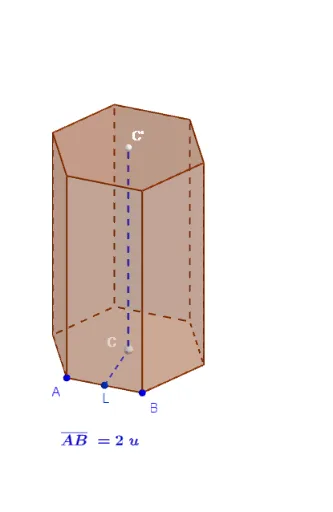
① This example demonstrates how to construct a prism in GeoGebra's 3D environment, starting from a polygon base and using the Prism command to create the solid, while visualizing its faces, edges, and vertices. ② Core mathematical concepts include solid geometry (prism definition), polygons, segments, midpoints, perpendicular bisectors, and distance measurement, along with coordinate geometry relations among points, lines, and planes. ③ Construction highlights: Based on the construction summary, the commands used are Polygon (to create the base), Distance (to measure side lengths), LineBisector and Intersect (to determine auxiliary geometric relations), Prism (to generate the 3D prism), Midpoint and Segment (for auxiliary constructions), with multiple named objects such as points A, B, C, D, etc., and face 'cara1'. ④ Suitable for high school or early university students learning solid geometry, as an interactive tool to understand prism structure and GeoGebra 3D construction techniques, also useful for classroom demonstrations.
GeoGebra Commands & Parameters
Polygon(A, B, n) → poly1, f, p, C_1, D, E, F, G, H, I, J, g, h_1, i, j, k, l, m, n_{1}Distance(A, B) → distanceABLineBisector(A, B) → qLineBisector(B, C_1) → rIntersect(q, r) → CPrism(poly1, h) → b, K, cara1, cara2, cara3, cara4, cara5, cara6, face1, face2, face3, cara7, M, arista1, arista2, arista3, arista4, arista5, arista6, arête1, arête3, arête5, arista7, N, arista8, arista9, arista10, arista11, arista12, arête2, arête4, arête6, O, P, Q, R, S, TMidpoint(A, B) → LSegment(L, C) → cSegment(C, (x(C), y(C), h)) → t
AI Drawing Prompt Reference
In 3D space, start by drawing a regular polygon as the base and measure the length of one of its sides. Then, construct the perpendicular bisectors of two adjacent sides of the base and find their intersection point, which lies inside the base. Next, extrude this polygon vertically by a given height to form a prism, displaying all its lateral faces, edges, and vertices. Finally, draw a segment from the midpoint of one base edge to the interior intersection point, and another vertical segment from that point upward, to help visualize the internal structure of the prism.
The prompt above was compiled from the original drawing commands and is for reference only.