
Constructing the Largest Inscribed Rectangle in an Ellipse
Loading the math board and drawing, please wait…
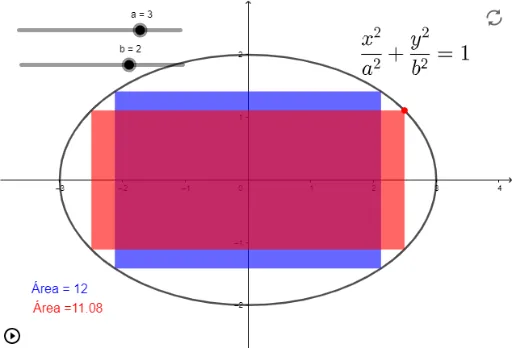
This example demonstrates how to construct the largest rectangle inscribed within an ellipse. It involves core mathematical concepts such as calculus, optimization problems, and coordinate geometry. Key construction elements include using GeoGebra commands like Polygon, Point, and objects like points (A_1 to A_4) and variables (a, b). Suitable for high school and above students to explore the intersection of ellipses and optimization.
GeoGebra Commands & Parameters
Polygon(A_1, A_2, A_3, A_4) → q2, f, a_2, a_3, a_4Point(eq1) → APolygon(A, B, C, D) → q1, a_1, b_1, c, d
AI Drawing Prompt Reference
Draw an ellipse and construct the largest rectangle inscribed within it. Start by sketching the ellipse, then identify four key points on the ellipse along its axes of symmetry, and connect them to form a rectangle. Next, create another smaller rectangle inside the ellipse with its vertices on the ellipse and sides parallel to the axes. Adjust the vertices to maximize the rectangle's area, finally showing the relationship between this maximal inscribed rectangle and the ellipse.
The prompt above was compiled from the original drawing commands and is for reference only.