
Quadratic Fit
Loading the math board and drawing, please wait…
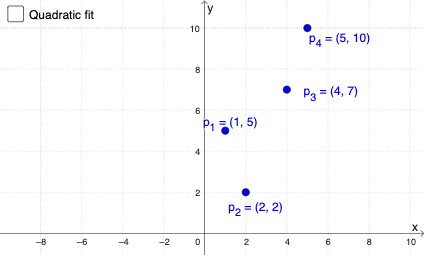
This example demonstrates quadratic function fitting using GeoGebra, showing the relationship between data points and the fitted curve. Core math concepts include quadratic functions, data fitting, and coefficient analysis. Key GeoGebra commands used are Sequence for generating points, FitPoly for fitting, LaTeX for displaying formulas, and Coefficients for showing coefficients. Suitable for high school mathematics teaching to understand data fitting and applications of quadratic functions.
GeoGebra Commands & Parameters
Sequence("p_{" + (k) + "}", k, 1, 15) → LtxtFitPoly(P1:P4, 2) → gLaTeX(g, true, true) → text1Coefficients(g) → l1LaTeX("p(t)=" + (ReplaceAll[Text[g], "x", "t"])) → text2a
AI Drawing Prompt Reference
Draw a graph of a quadratic function fit. The graph should include a set of data points and a smooth quadratic curve. The data points should be distributed in the coordinate system, and the curve should pass through these points to show the fitting relationship. The construction order is to first draw the data points, then the curve, and finally display the equation and coefficients of the curve.
The prompt above was compiled from the original drawing commands and is for reference only.