
Constructing Intersections of an Ellipse and a Line
Loading the math board and drawing, please wait…
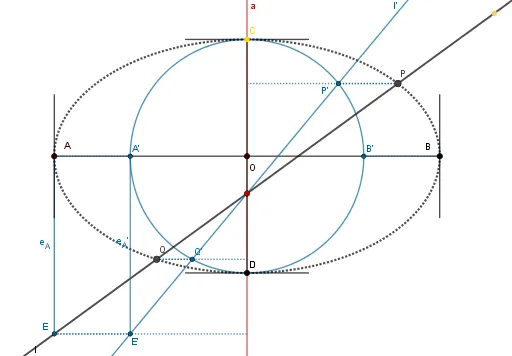
This example demonstrates how the intersection points between an ellipse and a line are constructed on the coordinate plane, and how the configuration changes in the special case of tangency where the line touches the ellipse. The key ideas include the geometry of intersections between a conic (ellipse) and a line, the notion of a tangent line (tangency), and the practical workflow for computing/locating intersection points using geometric construction tools. In GeoGebra, the construction uses commands such as Line and Conic to define the line and the ellipse, and Intersect to compute the intersection points. To support the geometric setup and related features (e.g., auxiliary points and tangent-related positioning), it also leverages OrthogonalLine, Mirror, Segment, and Point, along with multiple constructed objects that serve as references for the final labeled intersection structure. Suitable for high school through early undergraduate geometry/conics instruction, and for interactive classroom demonstrations and exploration.
GeoGebra Commands & Parameters
Segment(A, O) → f_1OrthogonalLine(O, f_1) → nPoint(n) → CMirror(C, O) → DSegment(O, D) → l_2Point(n) → ILine(J, I) → lLine(O, A) → k_1Segment(C, O) → gLine(A, g) → hLine(C, f_1) → iCircle(A, C_1) → cCircle(C, Radius[c]) → d_2Intersect(c, h) → D_1, E_1Intersect(d_2, i) → F_1, GSegment(D_1, E_1) → jSegment(F_1, G) → kMirror(F_1, O) → F'_1Mirror(G, O) → G'Segment(F'_1, G') → k'Mirror(D_1, O) → D'_1Mirror(E_1, O) → E'_1Segment(D'_1, E'_1) → j'Mirror(A, O) → BSegment(O, B) → mLine(C, D) → aLine(A, a) → pCircle(O, C) → dIntersect(d, k_1) → B', A'Segment(A, A') → m_1Segment(B', B) → n_1Intersect(p, l) → ESegment(A, E) → e_ALine(A', a) → qLine(E, f_1) → rIntersect(q, r) → E'Intersect(a, r) → HSegment(A', E') → e_A'Segment(E', E) → l_1Segment(E, H) → sLine(E', I) → l'Intersect(d, l') → Q', P'Line(Q', s) → tLine(P', s) → bIntersect(b, l) → PIntersect(t, l) → QIntersect(a, b) → KIntersect(a, t) → LSegment(P, K) → g_1Segment(Q, Q') → p_1Segment(P, P') → fSegment(Q, L) → h_1Mirror(K, a) → K'Mirror(L, a) → L'Conic(A, D, B, C, P) → c_1
AI Drawing Prompt Reference
Draw an ellipse and a line on a coordinate plane. Construct the intersection points between the ellipse and the line, and show the special case of tangency where the line touches the ellipse. Use auxiliary points, reflected points, and line segments to locate the intersection points. The construction process includes defining the ellipse and line, creating auxiliary points, reflecting points, calculating intersection points, and drawing reflected intersection points to demonstrate symmetry. Ensure the graph is clear with labeled points to help understand the geometric relationships.
The prompt above was compiled from the original drawing commands and is for reference only.