
Constructing a Triangle Given Perimeter and Both Base Angles
Loading the math board and drawing, please wait…
In collections
CLASS IX CBSE MATHS ACTIVITIES
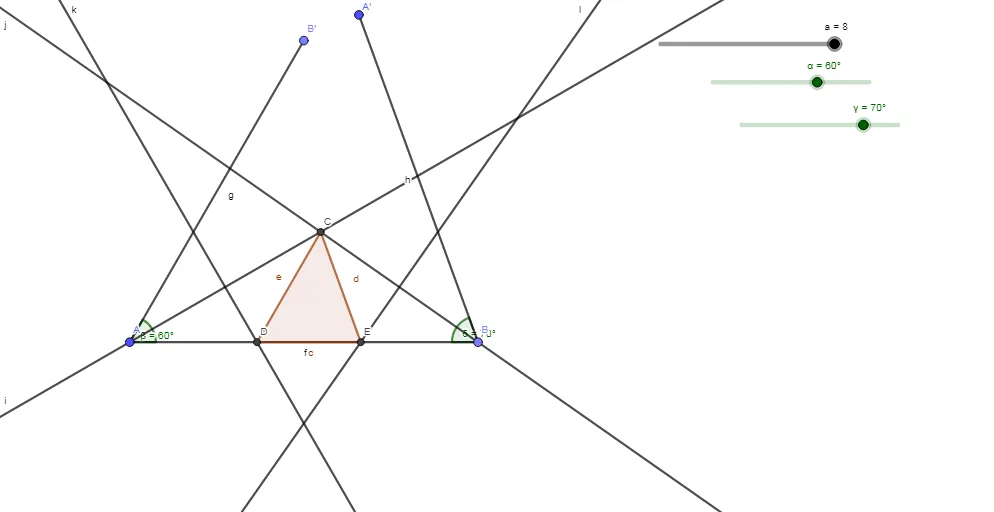
This example demonstrates how to construct a triangle when the perimeter and both base angles are given. The key math concepts involved include angle measurement, geometric construction of triangles, and geometric constructions. The construction highlights the use of GeoGebra commands and objects such as Point, Segment, Rotate, Angle, AngularBisector, Intersect, LineBisector, and Polygon. Suitable for high school mathematics teaching and geometric construction learning.
GeoGebra Commands & Parameters
Point(Circle[A, a]) → BSegment(A, B) → fRotate(B, α, A) → B'Angle(B, A, B') → βSegment(A, B') → gRotate(A, (-γ), B) → A'Angle(A', B, A) → δSegment(A', B) → hAngularBisector(B', A, B) → iAngularBisector(A', B, A) → jIntersect(i, j) → CLineBisector(A, C) → kLineBisector(C, B) → lIntersect(f, k) → DIntersect(f, l) → EPolygon(C, D, E) → t1, e, c, d
AI Drawing Prompt Reference
Given the perimeter and two base angles of a triangle, start by taking a point B on a circle and connecting AB. Then rotate B to get B', measure angle BAB' to get β, and connect AB'. Next, rotate A to get A', measure angle A'BA to get δ, and connect A'B. Construct the angle bisectors of B'A and A'B, intersecting at C. Construct the perpendicular bisectors of AC and CB, intersecting at D and E, respectively. Finally, connect C, D, and E to form triangle CDE.
The prompt above was compiled from the original drawing commands and is for reference only.