
Constructing a Rectangle with GeoGebra
Loading the math board and drawing, please wait…
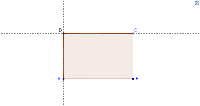
This example demonstrates how to construct a rectangle using GeoGebra. The core mathematical concepts involved include point coordinates, perpendicular line relationships, and polygon construction. The construction process primarily utilizes the following GeoGebra commands and objects: Segment (line segment), OrthogonalLine (perpendicular line), Point (point), Line (line), Intersect (intersection), and Polygon (polygon). These commands and objects help users accurately draw the four vertices and four sides of the rectangle, completing the construction. This example is suitable for students in middle school and above, serving as an auxiliary teaching material for geometric construction to help students understand the definition and properties of rectangles.
GeoGebra Commands & Parameters
Segment(A, B) → aOrthogonalLine(B, a) → bPoint(b) → CLine(C, a) → cLine(A, b) → dIntersect(c, d) → DPolygon(A, B, C, D) → poly1, a_1, b_1, c_1, d_1