
Constructing a Parallelogram with a Given Area
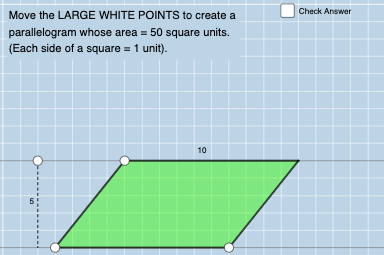
Loading the math board and drawing, please wait…
In collections
Parallelograms: Counting Squares
This example demonstrates how to construct a parallelogram with a specified area. Key mathematical concepts include geometry, parallelograms, and area calculation. GeoGebra commands such as Ray, Polygon, and Segment are used in the construction. Suitable for middle school and above students for geometric construction practice.
GeoGebra Commands & Parameters
Ray(B, B + (1, 0)) → fPoint(f) → CPolygon(A, C, E, D) → q1, a, c, e, dSegment(A, C) → gSegment(C, E) → hSegment(E, D) → iSegment(D, A) → jRandomElement(L_1) → b, 50Point(p) → FOrthogonalLine(F, p) → lIntersect(q, l) → GSegment(F, G) → m
AI Drawing Prompt Reference
Construct a parallelogram in the plane using four vertices A, C, E, and D, arranged so that the sides form the closed quadrilateral A–C–E–D. Start by fixing a direction using a ray from B, choose the point C along that direction, then place E and D so that the segments A–C, C–E, E–D, and D–A connect in order to form the parallelogram outline. Next, take a random point F, draw a line through F that is perpendicular to a chosen reference line (represented by p), find its intersection G with the parallelogram-related figure, and draw the segment F–G as a key construction segment.
The prompt above was compiled from the original drawing commands and is for reference only.