
Constructing a Line Equation
Loading the math board and drawing, please wait…
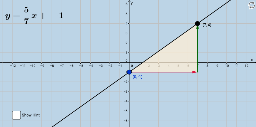
This example demonstrates the relationship between the equation of a line graphed in the coordinate plane, its slope, and its intercepts. Key math concepts include linear equations, slope, intercepts, vectors, and distance calculations. It is constructed using GeoGebra commands like Point, Line, Intersect, FractionText, Polygon, Vector, Length, and Distance, making it suitable for high school students to understand the geometric meaning and parametric representation of line equations.
GeoGebra Commands & Parameters
Point(a) → ALine(A, B) → bIntersect(c, d) → CFractionText(Slope[b]) → text1Polygon(A, C, B) → poly1, b_1, a_1, c_1Vector(A, C) → uVector(C, B) → vLength(u) → fDistance(A, C) → distanceACDistance(C, B) → distanceCB
AI Drawing Prompt Reference
Draw a coordinate plane with a straight line crossing both axes. Mark the intersection points of the line with the axes. Choose one point on the line and another point at an axis intersection, then form a right triangle using these two points and the origin. Display the slope of the line as a fraction near the line. Draw a vector from the first chosen point to the axis intersection, and another vector from that intersection to the second point. Label the lengths of both vectors, and also label the distances between the first point and the intersection, and between the intersection and the second point. The figure should illustrate the geometric relationship among the line equation, slope, intercepts, vectors, and distances.
The prompt above was compiled from the original drawing commands and is for reference only.