
Construct a Right Angle in a Circle
Loading the math board and drawing, please wait…
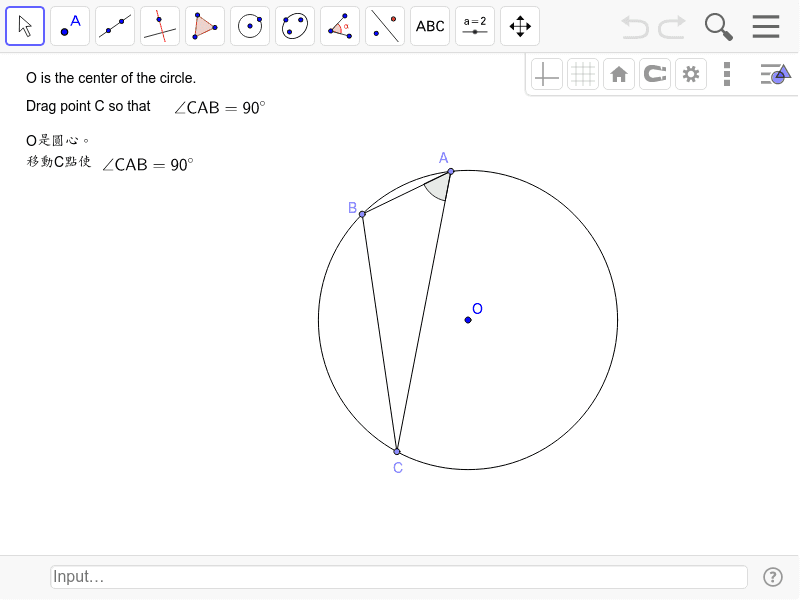
This example demonstrates how to construct a right angle within a circle using GeoGebra. Key math concepts include circles, triangles, and right angles. The construction involves commands and objects such as Circle, Point, Segment, and Angle. It is suitable for middle school and above students learning geometric constructions.
GeoGebra Commands & Parameters
Circle(O, B_1) → cPoint(c) → APoint(c) → BSegment(A, B) → aPoint(c) → CSegment(B, C) → bSegment(C, A) → dAngle(B, A, C) → α
AI Drawing Prompt Reference
Draw a circle. Pick three arbitrary points on the circumference and connect them to form a triangle. One side of the triangle serves as the base, and the other two sides connect the base endpoints to the third point on the circle. Mark the angle at the third point, formed by the two sides meeting there, and display its measure. This angle should be exactly 90 degrees because it is an inscribed angle subtending a diameter. The figure should include the circle, the triangle, and a right-angle symbol at that vertex.
The prompt above was compiled from the original drawing commands and is for reference only.