
Connectivity Table by chris cambré (2)
Loading the math board and drawing, please wait…
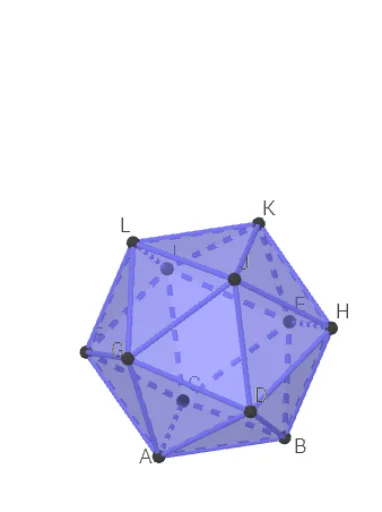
This example demonstrates the connectivity table of a polyhedron, involving the structure of a dodecahedron in solid geometry. Using GeoGebra commands such as Circle, Intersect, Rotate, and Point, a dodecahedron is constructed and its faces and edges are shown to be connected. Suitable for high school or university solid geometry courses.
GeoGebra Commands & Parameters
Circle(OO, 1, xOyPlane) → cIntersect(xAxis, c, 1) → ARotate(A, 72°) → BPoint(Circle[Midpoint[A, B], (Distance[A, B] * sqrt(3) / 2), Segment[A, B]]) → CIcosahedron(A, B, C) → a, D, zijvlakABC, zijvlakACF, zijvlakAFG, zijvlakADG, zijvlakABD, zijvlakBDH, zijvlakBEH, zijvlakBCE, zijvlakCEI, zijvlakCFI, E, zijvlakEHK, zijvlakEIK, zijvlakIKL, zijvlakFIL, zijvlakHJK, zijvlakJKL, zijvlakGJL, zijvlakFGL, zijvlakDHJ, zijvlakDGJ, F, RibbeAC, RibbeAB, RibbeBC, RibbeAF, RibbeCF, RibbeAG, RibbeFG, RibbeAD, RibbeDG, RibbeBD, G, RibbeBH, RibbeDH, RibbeBE, RibbeEH, RibbeCE, RibbeCI, RibbeEI, RibbeFI, RibbeEK, RibbeHK, H, RibbeIK, RibbeIL, RibbeKL, RibbeFL, RibbeJK, RibbeHJ, RibbeJL, RibbeGL, RibbeGJ, RibbeDJ, I, J, K, LTableText({{"A", "B", "C", "D", "E", "F", "G", "H", "I", "J", "K", "L"}}) → tekst1TableText({{"A"}, {"B"}, {"C"}, {"D"}, {"E"}, {"F"}, {"G"}, {"H"}, {"I"}, {"J"}, {"K"}, {"L"}}) → tekst2
AI Drawing Prompt Reference
Draw a dodecahedron with 12 pentagonal faces and 30 edges. Start by drawing a circle, then create points A, B, and C through rotation and intersection, and build the dodecahedron's faces and edges. Finally, list all vertex names.
The prompt above was compiled from the original drawing commands and is for reference only.