
Conic Sections under Light Projection
Loading the math board and drawing, please wait…
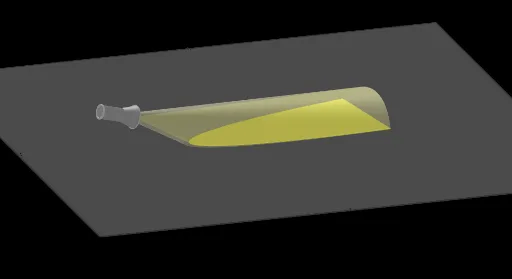
This example demonstrates the changes of conic sections under light projection. Key mathematical concepts include the properties of conic sections and geometric transformations of light projection. Using GeoGebra commands such as Ray, Intersect, and Mirror, the projection effects of conic sections at different angles of light can be constructed. Suitable for high school mathematics education, particularly in coordinate geometry and solid geometry.
GeoGebra Commands & Parameters
Ray(S, C) → gOrthogonalLine(S, xOyPlane) → hIntersect(h, xOyPlane) → DRay(D, C) → iMirror(S, C) → S'Line(S, S') → jIntersect(j, xOyPlane) → EPlane(E, S, D) → pCircle(S', 2, zAxis) → dOrthogonalLine(E, p) → kCircle(S', Distance[S, S'] / 4, j) → eCone(e, (-Distance[S', S])) → l, q, mIntersectPath(xOyPlane, l) → sPolygon(A, B, G, F) → q1, a, b, g_1, fPrism(q1, 14.976227813826487) → c, H, arêteAH, arêteBI, arêteGJ, arêteFK, arêteHI, arêteIJ, arêteJK, arêteHK, I, J, K, faceABIH, faceBGJI, faceFGJK, faceAFKH, faceHIJKTranslate(S, Vector[(0.15 * Vector[S', S])]) → S'_1Circle(S'_1, 0.4, j) → rCircle(S, 0.65, j) → tMidpoint(S'_1, S) → LMidpoint(L, S) → MCone(t, (-Distance[S, S'_1])) → o, c_1, uCircle(M, 0.4, j) → d_1Cylinder(d_1, (-Distance[M, S'_1])) → v, e_1, wCircle(S, 0.6, j) → f_1Line(L, k) → h_1Intersect(h_1, w) → N, OCone(e, (-Distance[S', L])) → n, n_2, n_3
AI Drawing Prompt Reference
Illustrate the transformation of conic sections under light projection. Start by drawing a ray from a point, then a perpendicular line to the coordinate plane. Connect the intersection point with the origin to form a second ray. Reflect the origin across the first ray and connect the reflected point to the origin. Create a plane at the intersection point, draw a circle centered at the reflected point, and form a cone with the reflected point as the vertex. Intersect the cone with the coordinate plane to get the conic section. Add several cylinders and cones near the cone's vertex for a 3D effect.
The prompt above was compiled from the original drawing commands and is for reference only.