
Conic Sections: Dynamic and Modifiable Illustrator and Investigation
Loading the math board and drawing, please wait…
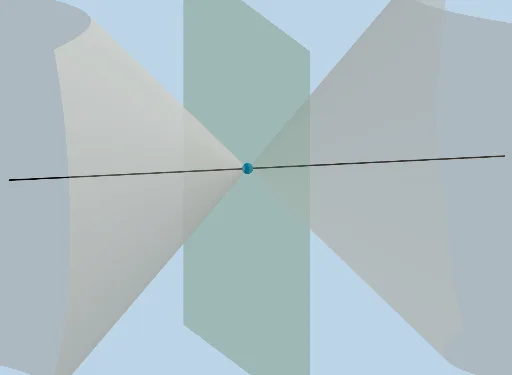
This interactive GeoGebra example dynamically demonstrates the generation and properties of conic sections (ellipse, parabola, hyperbola) by intersecting a plane with a cone. Users can adjust parameters to observe how the curve type and shape change. Core mathematical concepts include the geometric definition of conics, foci, directrix, eccentricity, and transformations. The construction uses GeoGebra commands such as IntersectPath, Line, Distance, Sphere, Intersect, Rotate, CircleSector, Dilate, Vector, and Translate, along with points, lines, circles, and spheres to build a 3D cone and cutting plane, with sliders or draggable points for dynamic adjustment. Suitable for high school or college analytic geometry courses, it provides an intuitive visual understanding of the unified geometric origin of conics and the influence of parameters, and serves as an excellent tool for investigative learning.
GeoGebra Commands & Parameters
IntersectPath(c, a) → dLine((0, 0, 0), (1, 0, 1)) → fLine(A, f) → gDistance(A, (0, 0, 0)) → eSphere(A, (0.4 * e)) → hIntersectPath(y = 0, h) → kIntersect(g, k) → B, CIntersect(xAxis, k) → D, ERotate(D, If[0 < i ≤ 1, ((-i) * π / 4), ((-π)) / 4], A, Line[(4, 0, 0), (4, 1, 0)]) → D'CircleSector(A, D, D') → pDilate(A, If[1.5 < i ≤ 2.5, 2.5 - i, 0], (0, 0, 0)) → A'Vector(A, A') → uTranslate(p, u) → p'Line(A, (x(A), y(A) + 1, 0)) → lRotate(j, ((-m) * π / 180), l) → j'IntersectPath(j', a) → qLine((100, 0, 0), A) → n
AI Drawing Prompt Reference
Draw a 3D cone with its apex at the origin and a circular base. A rotatable plane intersects the cone, producing conic sections (ellipse, parabola, or hyperbola). Place a sphere inside the cone, tangent to the cone's lateral surface and to the cutting plane, determining foci and directrix. Dynamically adjust the plane's angle and position via rotation and scaling to observe changes in curve type. Also, draw a circular sector on the cone's surface and translate it along the axis to illustrate cone generation. Add a line from the apex and an auxiliary line related to the cutting plane to mark geometric relationships.
The prompt above was compiled from the original drawing commands and is for reference only.