
Conic Sections Demo by Irina Boyadzhiev
Loading the math board and drawing, please wait…
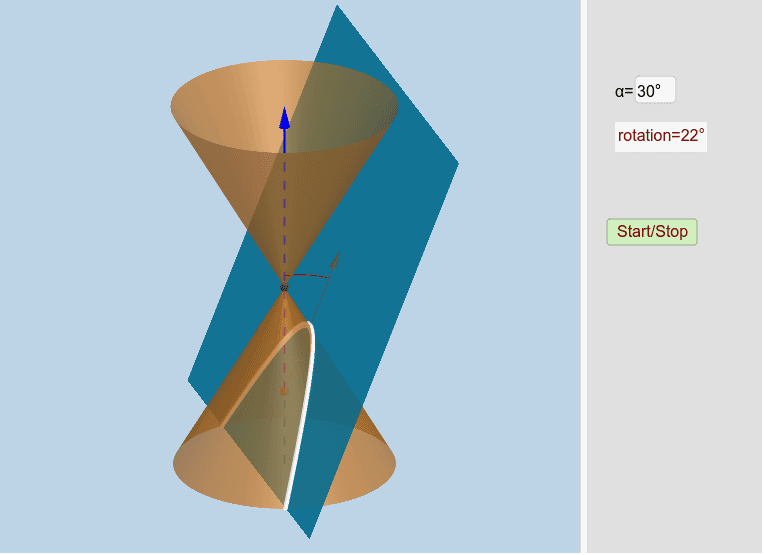
This example demonstrates the formation of conic sections (ellipse, parabola, hyperbola) and their geometric relationships with planes, spheres, and polygons. Core mathematical concepts include coordinate geometry, linear equations, polygons, vectors, and parametric equations. Key GeoGebra commands/objects used are OrthogonalLine, Point, Line, Circle, Intersect, CircleArc, Plane, Mirror, InfiniteCone, IntersectPath, Vertex, Angle, Ray, Vector, and Textfield. Suitable for high school students and math enthusiasts studying the geometric essence and algebraic representation of conic sections.
GeoGebra Commands & Parameters
OrthogonalLine(M, xOyPlane) → aPoint(a) → BLine(A, yAxis) → gCircle(A, 16, xAxis) → cIntersect(g, c) → X_1, JIntersect(zAxis, c) → Z_1, Z_2CircleArc(A, X_1, Z_1) → fPoint(f) → CCIf(j < 0, A + (0, (16 * cos(0)), (16 * sin(0))), If[j < π / 2 - α - 0.01, A + (0, (16 * cos(j)), (16 * sin(j))), If[j < π / 2 - α + 0.1, A + (0, (16 * cos(π / 2 - α)), (16 * sin(π / 2 - α))), If[j < π / 2 + 0.1, A + (0, (16 * cos(j - 0.1)), (16 * sin(j - 0.1))), If[j > π / 2 + 0.1, A + (0, (16 * cos(π / 2)), (16 * sin(π / 2)))]]]]) → XXIf(anim, XX, CC) → CPoint(zAxis) → HIntersect(zAxis, xAxis) → OLine(C, A) → dLine(A, B) → bPlane(d, b) → eMirror(H, xOyPlane) → H'Point(zAxis) → IInfiniteCone(O, H, α) → mIntersectPath(e, m) → pVertex(p) → D, E, F, GAngle(C, A, Z_1) → βCircleArc(A, C, Z_1) → hCircle(A, 20, xAxis) → kRay(A, C) → iIntersect(i, k) → K,Vector(A, K) → lTextfield(α) → inputBox1