
Conic Sections and Their Construction
Loading the math board and drawing, please wait…
In collections
MATH1052-edX
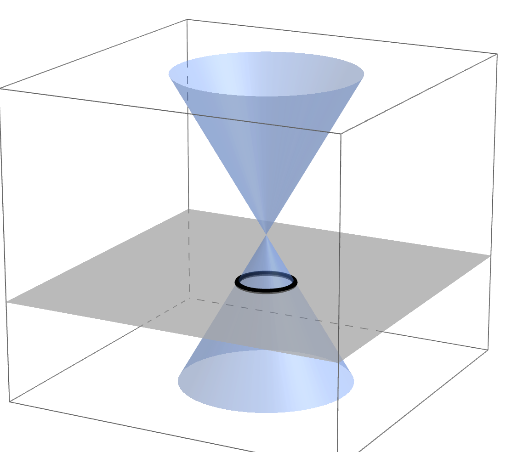
This example demonstrates the construction and analysis of conic sections, specifically parabolas and circles. The key mathematical concepts involved include conic sections, functions, parametric equations, and inequalities. The construction involves using GeoGebra commands such as Segment, Rotate, Point, Cone, Length, and If to create geometric objects and perform calculations. This example is suitable for high school students or college freshmen for learning analytic geometry and function graphing.
GeoGebra Commands & Parameters
Segment(A, C2) → lRotate(Plane[B, xOyPlane], α, Line[B, yAxis]) → pPoint(xAxis) → CCone(C1, C2, r) → c1, c, aCone(C3, C2, r) → c2, d, bRemoveUndefined(Zip[IntersectPath[p, c], c, Lc]) → LcpLength(Lcp) → sizeIf(size ≟ 2 ∧ α ≠ 45°, text4, If[size ≟ 1 ∧ α ≟ 60°, text3, If[size ≟ 1 ∧ (α ≟ 0° ∨ α ≟ 180°), text2, If[size ≟ 2 ∧ α ≟ 45°, text5, text1]]]) → ShowText
AI Drawing Prompt Reference
Draw a 3D coordinate system with two cones sharing the same apex and base radius but with different base centers, creating intersecting conical surfaces. Place a horizontal segment as a reference. Rotate a plane around the vertical axis by a variable angle. This plane intersects both cones, producing curves (circles, parabolas, or hyperbolas). Based on the number of intersection curves and the rotation angle, display different text labels near the figure: for two curves at 45 degrees show one text, for one curve at 60 degrees show another, for one curve at 0 or 180 degrees show a third, and for two curves at 45 degrees show a fourth, otherwise show a default text. The scene illustrates conic section construction and classification.
The prompt above was compiled from the original drawing commands and is for reference only.