
Conic Sections and Elements of Conic Curves
Loading the math board and drawing, please wait…
In collections
Conic Sections' study using Geogebra applet
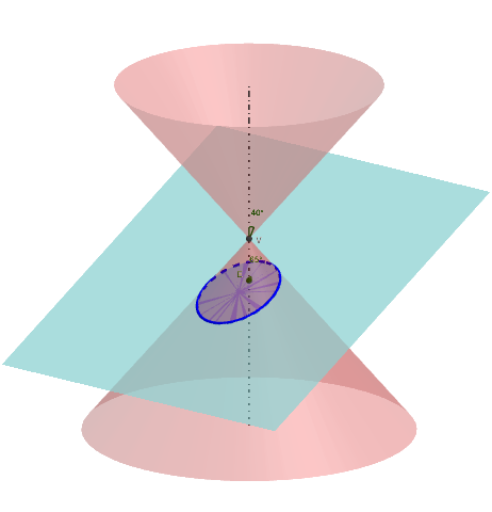
This example demonstrates the formation of conic sections (ellipse, hyperbola, parabola) and their elements. Key math concepts include conic sections, ellipse, hyperbola, parabola, geometric construction, and analytical geometry. Construction highlights involve commands like Intersect, Point, Line, InfiniteCone, Plane, Rotate, Angle, IntersectPath, Midpoint, OrthogonalLine, AngularBisector, Circle, Sphere, Mirror, Segment, Ray, Tangent, CircumcircleArc, LineBisector, Locus, Textfield, and PointIn. Suitable for high school mathematics teaching and learning the properties and constructions of conic curves.
GeoGebra Commands & Parameters
Intersect(yAxis, xAxis) → VPoint(zAxis) → BLine(V, B) → aInfiniteCone(V, B, g) → conePoint(a) → HPlane(Q_1, a) → bRotate(B, p, V, b) → B'Angle(B, V, B', b) → αLine(V, B') → cLine(Q_1, c) → dIntersectPath(b, cone) → eIntersect(a, d) → ARotate(Q_1, (-p), A, b) → P'Angle(P', A, Q_1, b) → βRotate(B, g, V, b) → B'_1Angle(B, V, B'_1, b) → γIntersect(d, e) → V_1, V_2Midpoint(V_2, V_1) → COrthogonalLine(C, b) → fAngularBisector(V, V_1, A) → iOrthogonalLine(Q_1, e) → hPlane(d, h) → jIntersectPath(j, cone) → kOrthogonalLine(V_1, i, b) → lIntersect(a, i) → E2Intersect(l, a) → E1Line(V, V_1) → mIntersect(f, k) → V_3, V_4Intersect(d, a) → ELine(V, V_1) → b_1AngularBisector(d, m) → n, qIntersect(a, n) → E_1Intersect(a, q) → E_2OrthogonalLine(E_1, m, b) → rOrthogonalLine(E_2, m, b) → sIntersect(m, r) → DIntersect(m, s) → FCircle(a, D) → e_1Circle(a, F) → e_2Sphere(E_1, D) → oSphere(E_2, F) → uMirror(D, a) → D'Mirror(F, a) → F'Plane(e_1) → vPlane(e_2) → wIntersectPath(j, v) → d_1IntersectPath(j, w) → d_2OrthogonalLine(E_1, d, b) → k_1OrthogonalLine(E_2, d, b) → l_1Intersect(d, k_1) → F_1Intersect(d, l_1) → F_2Segment(V_3, V_4) → n_1Ray(V_1, F_1) → p_1Ray(V_2, F_2) → q_1Intersect(d, d_1) → GSegment(V_2, V_1) → m_1Tangent(V_1, k) → t_1, i_2Tangent(V_2, k) → j_2, t_7Tangent(V_3, k) → k_2, t_8Tangent(V_4, k) → l_2, t_9Circle(C, F_1, j) → p_2Circle(C, F_2, j) → c_3Intersect(t_7, c_3, 2) → ILine(C, I) → i_1Intersect(t_1, c_3, 1) → JLine(C, J) → t_{10}Point(t_{10}) → KPoint(i_1) → LCircle(F_2, Segment[V_1, V_2], j) → c_2Intersect(c_2, k) → O, Z, G_1, J_1Intersect(d, c_2, 1) → TIntersect(d, c_2, 2) → UOrthogonalLine(F_1, d, j) → t_6Intersect(t_6, c_2, 2) → MIntersect(t_6, c_2, 1) → NCircumcircleArc(M, T, N) → e_4CircumcircleArc(M, U, N) → f_2CircumcircleArc(M, T, N) → g_2Point(f_2) → P_1Point(g_2) → RLine(P_1, F_2) → b_2LineBisector(P_1, F_1, j) → h_2Intersect(b_2, h_2) → SLocus(S, P_1) → loc1Line(F_2, R) → m_2LineBisector(F_1, R, j) → n_2Intersect(m_2, n_2) → WLocus(W, R) → loc2Circle(F_1, Radius[c_2], j) → c_1Point(k) → PSegment(P, F_1) → r1OrthogonalLine(P, d_1, j) → s_2Intersect(d_1, s_2) → A_1Segment(P, A_1) → Pd_1Textfield(Q_1) → ct1Line(V, P) → b_3Circle(E, Q_1, b) → g_3Point(g_3) → B_1Rotate(Q_1, (-p), E, b) → Q'Angle(Q', E, Q_1, b) → δPoint(a) → C_1Circle(V, C_1, b) → h_3Rotate(C_1, g, V, b) → D_1Angle(C_1, V, D_1, b) → εPlane(V, j) → j_3IntersectPath(j_3, cone) → k_3Intersect(d, f) → C_ePointIn(j) → QLine(Q, f) → a_1Line(Q, d) → f_1Segment(F_1, P) → r_1Segment(P, F_2) → r_2Line(F_2, P) → d_3Point(d_3) → H_1Point(d_3) → I_1Ray(F_2, H_1) → n_3Ray(P, I_1) → m_3Tangent(P, k) → p_3, tPlane(V, E, V_1) → w_3IntersectPath(w_3, j) → f_4OrthogonalLine(P, w_3) → g_4Intersect(f_4, g_4) → K_1Line(V, K_1) → h_4IntersectPath(w_3, j_3) → i_4IntersectPath(w_3, v) → j_4IntersectPath(w_3, w) → k_4Circle(E1, F, w_3) → c_4Circle(E2, D, w_3) → d_4Line(V_2, t_1) → t_2Tangent(P, k) → l_4,Midpoint(F_1, F_2) → C_2Mirror(C_e, t_{10}) → L_1Mirror(t_{10}, d) → t_{11}OrthogonalLine(V_3, t_1, j) → t_3OrthogonalLine(V_4, t_1, j) → t_4Line(V, V_4) → j_1Line(V, V_3) → m_4Line(V, V_2) → n_4Line(V, V_1) → p_4Line(V, d) → q_4Line(V, t_{11}) → a_4Line(V, t_{10}) → b_4
AI Drawing Prompt Reference
Draw a diagram showing the formation of conic sections including an ellipse, hyperbola, and parabola. Start by plotting the intersection of coordinate axes and a line, then construct an infinite cone based on these elements. Rotate and intersect the cone with planes to get the conic sections. Mark key points like foci and vertices, and use geometric tools such as midpoints, perpendicular lines, and angle bisectors to draw elements like tangents. Add auxiliary circles and spheres, then reflect the shapes to achieve symmetry and complete the illustration of conic section elements.
The prompt above was compiled from the original drawing commands and is for reference only.