
Congruent Triangles Exercise 6
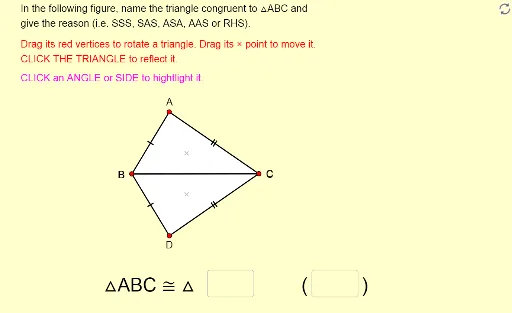
Loading the math board and drawing, please wait…
In collections
Unit 5: Triangle Congruence
Naming Congruent Triangles with Reasons
Naming Congruent Triangles with Reasons
Congruence cases
This example demonstrates how to name congruent triangles and provide reasons. Users can move, rotate, and reflect the triangles. Using GeoGebra commands such as Polygon, Vector, Angle, Intersect, Textfield, Segment, Midpoint, and Rotate, congruent triangles can be constructed and verified. Suitable for middle school geometry learning.
GeoGebra Commands & Parameters
Polygon(A, B, C) → poly1, c, a, bVector(P, A) → uVector(P, B) → vVector(P, C) → wPolygon(A_1, B_1, C_1) → poly1_1, c_1, a_1, b_1Vector(P_1, A_1) → u_1Vector(P_1, B_1) → v_1Vector(P_1, C_1) → w_1Angle(B, A, C) → αAngle(A, C, B) → βAngle(A_1, C_1, B_1) → γAngle(B_1, A_1, C_1) → δIntersect(Circle[X_0, Side_b], Circle[Y_0, Side_a]) → Z_0, L, ,Polygon(X_0, Y_0, Z_0) → poly2, z_0, x_0, y_0Textfield(text13) → Ans1Textfield(text14) → Ans2Segment(D, E) → rMidpoint(Segment[Intersect[Circle[A, r], b], Intersect[Circle[A, r], c]]) → FMidpoint(Segment[Intersect[Circle[C, r], a], Intersect[Circle[C, r], b]]) → GMidpoint(Segment[Intersect[Circle[A_1, r], b_1], Intersect[Circle[A_1, r], c_1]]) → HMidpoint(Segment[Intersect[Circle[C_1, r], a_1], Intersect[Circle[C_1, r], b_1]]) → IAngle(A_1, B_1, C_1) → εAngle(C, B, A) → ζMidpoint(Segment[Intersect[Circle[B, r], a], Intersect[Circle[B, r], c]]) → JMidpoint(Segment[Intersect[Circle[B_1, r], a_1], Intersect[Circle[B_1, r], c_1]]) → KRotate(Translate[Mirror[X_0, x = 0], translate], (-(180° - Angle[Y_0, X_0, Z_0])), (11, 0)) → X_1Rotate(Translate[Mirror[Y_0, x = 0], translate], (-(180° - Angle[Y_0, X_0, Z_0])), (11, 0)) → Y_1Rotate(Translate[Mirror[Z_0, x = 0], translate], (-(180° - Angle[Y_0, X_0, Z_0])), (11, 0)) → Z_1