
Conformal Mapping: Exploring Angle-Preserving Transformations in the Complex Pla
Loading the math board and drawing, please wait…
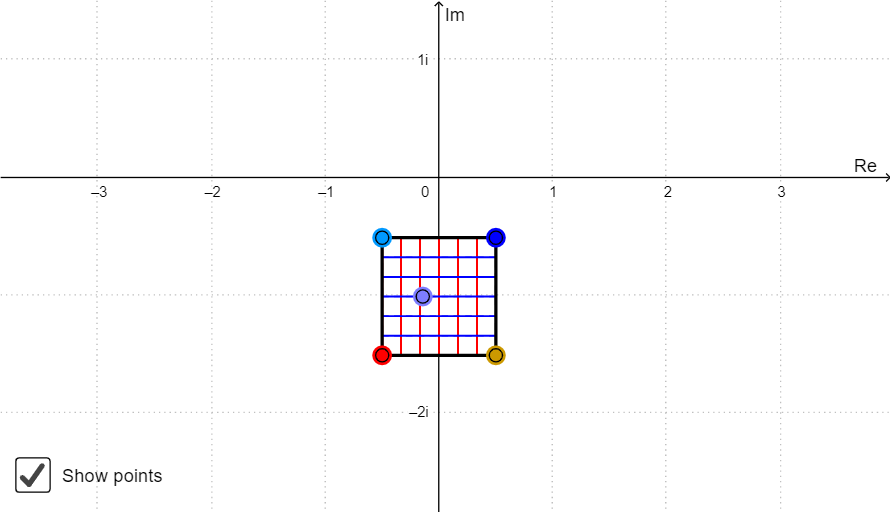
This GeoGebra demonstration illustrates conformal mapping by showing how simple geometric shapes (polygons, point sequences) transform under complex functions while preserving angles locally. Key mathematical concepts include complex number decomposition (FuncRe, FuncIm), conformal mapping functions, locus generation (Locus), and polygon construction (Polygon). The construction uses commands: Sequence for point generation, Point for defining key vertices, Centroid for polygon center, Join for connecting points, If for conditional logic, and LaTeX for formula display. Ideal for advanced mathematics and complex analysis courses, helping students visualize the geometric interpretation of analytic functions and angle preservation.
GeoGebra Commands & Parameters
Sequence(Segment[A + (i * (B - A) / a), C + (i * (D - C) / a)], i, 0, a) → list1Sequence(Segment[A + (i * (C - A) / a), B + (i * (D - B) / a)], i, 0, a) → list2Point(Element[list1, A1]) → B1Point(Element[list1, A2]) → B2Point(Element[list1, A3]) → B3Point(Element[list1, A4]) → B4Point(Element[list1, A5]) → B5Point(Element[list1, A6]) → B6Point(Element[list1, A7]) → B7Point(Element[list1, A8]) → B8Point(Element[list1, A9]) → B9Point(Element[list1, A10]) → B10Point(Element[list2, A1]) → C1Point(Element[list2, A2]) → C2Point(Element[list2, A3]) → C3Point(Element[list2, A4]) → C4Point(Element[list2, A5]) → C5Point(Element[list2, A6]) → C6Point(Element[list2, A7]) → C7Point(Element[list2, A8]) → C8Point(Element[list2, A9]) → C9Point(Element[list2, A10]) → C10Locus(D1, B1) → F1Locus(D2, B2) → F2Locus(D3, B3) → F3Locus(D4, B4) → F4Locus(D5, B5) → F5Locus(D6, B6) → F6Locus(D7, B7) → F7Locus(D8, B8) → F8Locus(D9, B9) → F9Locus(D10, B10) → F10Locus(E1, C1) → G1Locus(E2, C2) → G2Locus(E3, C3) → G3Locus(E4, C4) → G4Locus(E5, C5) → G5Locus(E6, C6) → G6Locus(E7, C7) → G7Locus(E8, C8) → G8Locus(E9, C9) → G9Locus(E10, C10) → G10Polygon(A, B, D, C) → poly1, a_1, b, d, cPoint(poly1) → ZLocus(Z', Z) → loc1Centroid(poly1) → OJoin({list1, list2}) → list3Point(list3) → EIf(4 ≤ Indexnames ≤ 6, unites, unitother) → ChooseunitLaTeX(Indexnames, true, true) → text3LaTeX(xmax, true, true) → text4LaTeX(xmin, true, true) → text5LaTeX(ymax, true, true) → text6LaTeX(ymin, true, true) → text7
AI Drawing Prompt Reference
Draw a quadrilateral region with each side divided into ten equal segments. Connect corresponding division points on opposite sides with straight lines, creating two sets of intersecting grid lines. Place points at the intersections of these grid lines)Skip the intersection points? Actually place points on the grid lines at each division, then let these points move along defined paths to generate two families of curves representing the mapped images. Add a movable point inside the quadrilateral and trace its path under the transformation. Mark the centroid of the quadrilateral. Show the combined grid and curve families to illustrate angle-preserving conformal mapping.
The prompt above was compiled from the original drawing commands and is for reference only.