
Cone Volume Dynamic Demo: Integral Construction from Base to Apex
Loading the math board and drawing, please wait…
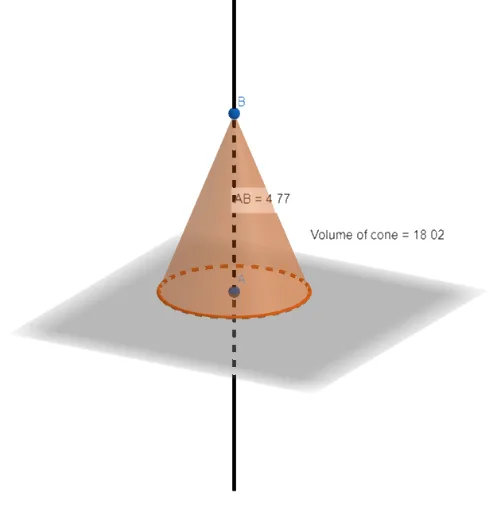
This GeoGebra example dynamically demonstrates the volume of a cone, visually connecting its geometric properties with the volume formula. It illustrates the cone's solid geometry and the integral calculus concept: by slicing the cone into thin disks along its height)Skip, the volume can be understood as the accumulation of circular areas. Construction highlights: OrthogonalLine creates the axis perpendicular to the base, Point defines the apex and base center, Cone generates the 3D solid, Distance measures radius and height, Midpoint assists in positioning, Volume computes the volume, and text objects display numerical results. Suitable for high school or early college students, this is ideal for teaching solid geometry, introductory calculus, or as a math lab activity to bridge abstract formulas with visual intuition.
GeoGebra Commands & Parameters
OrthogonalLine(A, xOyPlane) → fPoint(f) → BCone(A, B, r) → cone, c, bDistance(A, B) → distanceABMidpoint(A, B) →Volume(cone) → volumeaPoint(c) → Pointc
AI Drawing Prompt Reference
Draw a cone to demonstrate the calculation of its volume. Start by creating a perpendicular line from the apex to the base plane and mark the intersection point as the base center. Generate the 3D cone using the apex and base center. Measure the distance from the apex to the base for the height and compute the cone's volume. Finally, display the volume value as text to visually connect the geometric properties with the formula, ideal for educational purposes.
The prompt above was compiled from the original drawing commands and is for reference only.