
Cuboid Surface Area Self-Assessment: Building a Sum-and-Approximation Model
Loading the math board and drawing, please wait…
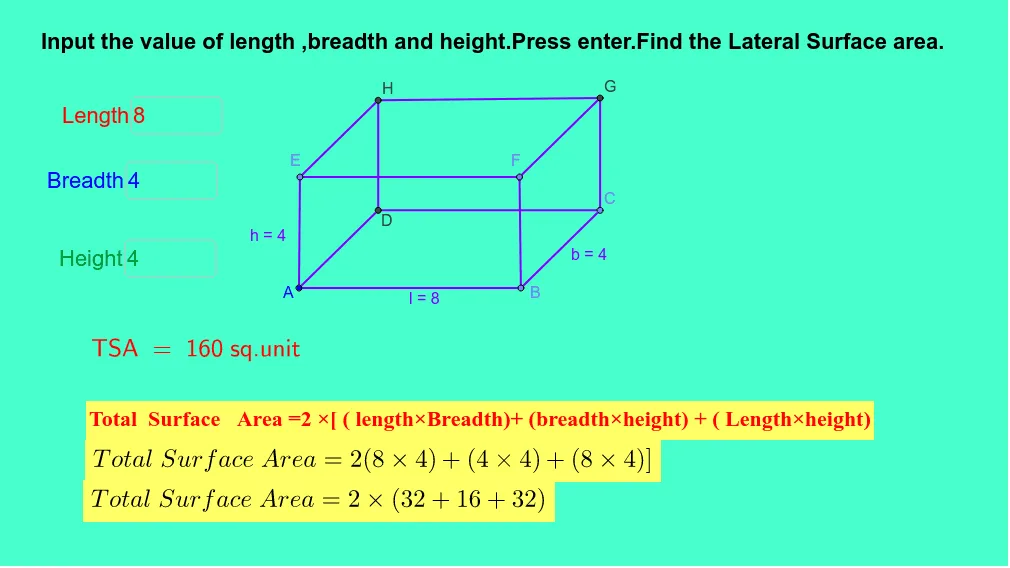
This example demonstrates how to construct an intuitive model for the surface area and lateral surface area of a cuboid by partitioning the surface into small strips/tiles and summing their areas. It connects the geometric quantity of a cuboid (length, width, height) with the idea behind upper/lower sums and Riemann-sum reasoning: approximate a continuous area with discrete pieces and accumulate them to recover the correct area behavior. Key concepts include solid geometry, lateral vs. total surface area, and sum-based approximation that supports the visual understanding of integration-style “accumulation.” Construction details: Textfield is used for entering dimensions; Point, Segment, Line define key vertices and edges; Intersect locates crossing points for accurate geometry; OrthogonalLine creates perpendicular partition lines/strip boundaries; named objects such as l_1, h_1, b, h, lb, bh, lh, A, and multiple indexed variables (e.g., inputBox1_1…inputBox3_3, along with a_2, B, c_2, C, D–F and i–m style components) represent the parameters, constructed strip elements, and summation parts. Suitable for middle/high school students and early calculus-integration intuition lessons, especially for self-assessment and guided exploration.
GeoGebra Commands & Parameters
Textfield(l_1) → inputBox1Textfield(b_2) → inputBox2Textfield(h_1) → inputBox3Textfield(l_1) → inputBox1_1Textfield(b_2) → inputBox2_1Textfield(h_1) → inputBox3_1Textfield(l_1) → inputBox1_2Textfield(b_2) → inputBox2_2Textfield(h_1) → inputBox3_2Textfield(l_1) → inputBox1_3Textfield(b_2) → inputBox2_3Textfield(h_1) → inputBox3_3Point(Circle[A, abs(l_1)]) → BSegment(A, B) → lPoint(Circle[B, abs(b_2)]) → CSegment(B, C) → bLine(C, l) → dLine(A, b) → eIntersect(e, d) → DSegment(D, C) → fSegment(D, A) → gOrthogonalLine(A, l) → iOrthogonalLine(B, l) → jOrthogonalLine(D, f) → kOrthogonalLine(C, f) → mPoint(Circle[A, abs(h_1)]) → ESegment(A, E) → hPoint(Circle[B, abs(h_1)]) → FSegment(B, F) → pLine(E, g) → qLine(E, l) → rLine(F, b) → sIntersect(m, s) → GIntersect(q, k) → HSegment(H, G) → tSegment(F, G) → a_1Segment(E, H) → b_1Segment(C, G) → c_1Segment(H, D) → d_1Segment(E, F) → e_1Textfield(l_1) → inputBox1_4Textfield(b_2) → inputBox2_4Textfield(h_1) → inputBox3_4Textfield(l_1) → inputBox1_5Textfield(b_2) → inputBox2_5Textfield(h_1) → inputBox3_5Textfield(l_1) → inputBox1_6Textfield(b_2) → inputBox2_6Textfield(h_1) → inputBox3_6Textfield(l_1) → inputBox1_7Textfield(b_2) → inputBox2_7Textfield(h_1) → inputBox3_7Point(Circle[A_1, abs(l_1)]) → B_1Segment(A_1, B_1) → l_2Point(Circle[B_1, abs(b_2)]) → C_1Segment(B_1, C_1) → b_3Line(C_1, l_2) → d_2Line(A_1, b_3) → e_2OrthogonalLine(A_1, l_2) → i_1OrthogonalLine(B_1, l_2) → j_1Point(Circle[A_1, abs(h_1)]) → E_1Segment(A_1, E_1) → h_2Line(E_1, l_2) → r_1Textfield(l_1) → inputBox1_8Textfield(b_2) → inputBox2_8Textfield(h_1) → inputBox3_8Textfield(l_1) → inputBox1_9Textfield(b_2) → inputBox2_9Textfield(h_1) → inputBox3_9Textfield(l_1) → inputBox1_{10}Textfield(b_2) → inputBox2_{10}Textfield(h_1) → inputBox3_{10}Textfield(l_1) → inputBox1_{11}Textfield(b_2) → inputBox2_{11}Textfield(h_1) → inputBox3_{11}Point(Circle[A_2, abs(l_1)]) → B_2Segment(A_2, B_2) → l_3Point(Circle[B_2, abs(b_2)]) → C_2Segment(B_2, C_2) → b_4Line(C_2, l_3) → d_3Line(A_2, b_4) → e_3OrthogonalLine(A_2, l_3) → i_2OrthogonalLine(B_2, l_3) → j_2Point(Circle[A_2, abs(h_1)]) → E_2Segment(A_2, E_2) → h_3Line(E_2, l_3) → r_2Textfield(l_1) → inputBox1_{12}Textfield(b_2) → inputBox2_{12}Textfield(h_1) → inputBox3_{12}Textfield(l_1) → inputBox1_{13}Textfield(b_2) → inputBox2_{13}Textfield(h_1) → inputBox3_{13}Textfield(l_1) → inputBox1_{14}Textfield(b_2) → inputBox2_{14}Textfield(h_1) → inputBox3_{14}Textfield(l_1) → inputBox1_{15}Textfield(b_2) → inputBox2_{15}Textfield(h_1) → inputBox3_{15}Textfield(l_1) → inputBox1_{16}Textfield(b_2) → inputBox2_{16}Textfield(h_1) → inputBox3_{16}Textfield(l_1) → inputBox1_{17}Textfield(b_2) → inputBox2_{17}Textfield(h_1) → inputBox3_{17}Textfield(l_1) → inputBox1_{18}Textfield(b_2) → inputBox2_{18}Textfield(h_1) → inputBox3_{18}Textfield(l_1) → inputBox1_{19}Textfield(b_2) → inputBox2_{19}Textfield(h_1) → inputBox3_{19}Point(Circle[A_3, abs(l_1)]) → B_3Segment(A_3, B_3) → l_4Point(Circle[B_3, abs(b_2)]) → C_3Segment(B_3, C_3) → b_5Line(C_3, l_4) → d_4Line(A_3, b_5) → e_4OrthogonalLine(A_3, l_4) → i_3OrthogonalLine(B_3, l_4) → j_3Point(Circle[A_3, abs(h_1)]) → E_3Segment(A_3, E_3) → h_4Line(E_3, l_4) → r_3Textfield(l_1) → inputBox1_{20}Textfield(b_2) → inputBox2_{20}Textfield(h_1) → inputBox3_{20}Textfield(l_1) → inputBox1_{21}Textfield(b_2) → inputBox2_{21}Textfield(h_1) → inputBox3_{21}Textfield(l_1) → inputBox1_{22}Textfield(b_2) → inputBox2_{22}Textfield(h_1) → inputBox3_{22}Textfield(l_1) → inputBox1_{23}Textfield(b_2) → inputBox2_{23}Textfield(h_1) → inputBox3_{23}Textfield(l_1) → inputBox1_{24}Textfield(b_2) → inputBox2_{24}Textfield(h_1) → inputBox3_{24}Textfield(l_1) → inputBox1_{25}Textfield(b_2) → inputBox2_{25}Textfield(h_1) → inputBox3_{25}Textfield(l_1) → inputBox1_{26}Textfield(b_2) → inputBox2_{26}Textfield(h_1) → inputBox3_{26}Textfield(l_1) → inputBox1_{27}Textfield(b_2) → inputBox2_{27}Textfield(h_1) → inputBox3_{27}Textfield(l_1) → inputBox1_{28}Textfield(b_2) → inputBox2_{28}Textfield(h_1) → inputBox3_{28}Textfield(l_1) → inputBox1_{29}Textfield(b_2) → inputBox2_{29}Textfield(h_1) → inputBox3_{29}Textfield(l_1) → inputBox1_{30}Textfield(b_2) → inputBox2_{30}Textfield(h_1) → inputBox3_{30}Textfield(l_1) → inputBox1_{31}Textfield(b_2) → inputBox2_{31}Textfield(h_1) → inputBox3_{31}
AI Drawing Prompt Reference
Draw a cuboid and partition its surface into small strips to estimate its surface area and lateral surface area by summing the areas of these strips. Input the length, width, and height, then create the cuboid's vertices and edges based on the inputs. Use perpendicular lines to partition the surface and calculate the area of each strip, then sum them up to see how the sum approximates the actual surface area.
The prompt above was compiled from the original drawing commands and is for reference only.