
Cone Surface: Dynamic Construction from Points, Segments to 3D Surface
Loading the math board and drawing, please wait…
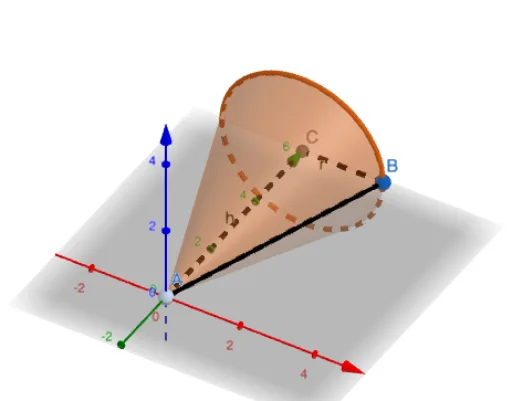
This GeoGebra example demonstrates how to construct a cone surface in 3D view, showing its generatrix, base circle, and apex. The core mathematical concepts include the geometric definition of a cone (generated by rotating a right triangle about one leg), the quadratic surface equation (e.g., z² = x² + y²), and properties of equilateral triangles in axial cross-sections. Construction highlights: use Point to create apex A and base center V, Segment to build generatrix l and radius r, Cone command to directly generate the solid, and Locus to trace a moving point D forming the generatrix path. Other objects include B, C, h (height), g (base circle), a, c, b (auxiliary segments/curves), and E, F, f, i as supporting elements. Suitable for high school solid geometry teaching to visualize cone generation, generatrix loci, and surface equations, as well as for university analytic geometry demonstrations of quadratic surfaces.
GeoGebra Commands & Parameters
Point(eq1) → BSegment(A, C) → hSegment(C, B) → rSegment(B, A) → gCone(C, A, r) → a, c, bLocus(D, B) → loc1Segment(F, D) → fSegment(D, E) → i
AI Drawing Prompt Reference
Draw a 3D cone with its apex at the top and the center of its base circle at the bottom. Create a vertical axis from the apex to the base center, and a radius segment from the base center to a point on the base edge. Connect the apex to that same edge point to form a generatrix (slant height). Animate a point moving along this generatrix to trace the lateral surface path of the cone. The base is a circle with the given radius. Additionally, include auxiliary segments such as a line from the apex to the base edge and a segment connecting two points on the base edge to illustrate cross-sections or supporting structures. The overall figure should clearly show the apex, base circle, axis, generatrix, and the moving point's locus, suitable for solid geometry teaching.
The prompt above was compiled from the original drawing commands and is for reference only.