
Hyperbola as a Conic Section in 3D
Loading the math board and drawing, please wait…
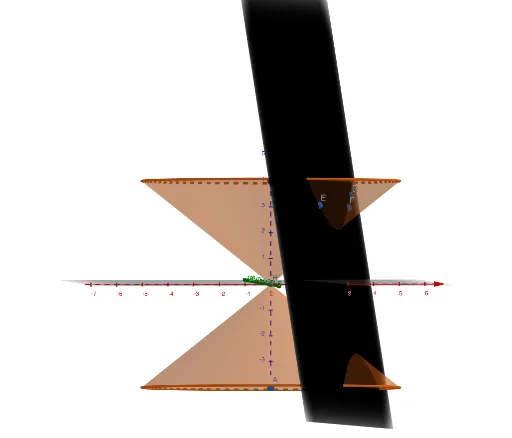
This GeoGebra example demonstrates the generation of a hyperbola by intersecting a cone with a plane in three-dimensional space, providing a vivid visualization of conic sections. The core mathematical concepts include the definition of a hyperbola, properties of conic sections, spatial relationships between planes and curved surfaces, and symmetry. Construction highlights: using Point and Intersect commands to define key points, Cone to create the cone, Plane to set the cutting plane, and PointIn to mark points on the plane, resulting in the hyperbola and related objects (A, B, C, D, E, F, etc.). This example is suitable for high school or college courses in analytic geometry and solid geometry, helping students understand the hyperbola as a conic section. It can be enhanced with sliders to dynamically adjust the plane's angle and observe changes in the curve.
GeoGebra Commands & Parameters
Point(zAxis) → AIntersect(xAxis, zAxis) → BCone(A, B, 5) → a, c, bPoint(zAxis) → CCone(C, B, 5) → d, e, fPointIn(f) → DPointIn(f) → EPointIn(f) → FPlane(D, E, F) → p
AI Drawing Prompt Reference
Create a 3D visualization showing a hyperbola as a conic section obtained by cutting a cone with a plane. Start with a vertical reference axis and choose one point on it to act as the cone’s apex. Use the intersection with a horizontal axis to set the cone’s base direction, then construct a cone with the given radius/scale. Choose another point on the vertical axis and, using the same horizontal-axis intersection, construct a second cone with the same scale. Mark several key points located on the cone surface(s), then define a cutting plane passing through those points. Display the intersection of that plane with the cone to reveal the resulting hyperbola, keeping the plane and the construction points visible.
The prompt above was compiled from the original drawing commands and is for reference only.