
Hyperbola: Dynamic Construction via Conic Section
Loading the math board and drawing, please wait…
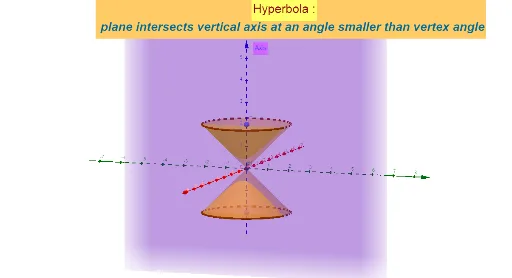
① This GeoGebra example demonstrates the generation of a hyperbola as a conic section, showing how a plane intersecting a cone produces the characteristic two-branched curve. ② Core mathematical concepts include the definition of a hyperbola (difference of distances to two foci is constant), conic sections, and key elements such as foci, transverse axis, and conjugate axis. ③ Construction details: The Point command creates key points, Intersect finds the intersection between the cone and the plane, and Cone constructs the 3D cone. Objects A, B, a, c, b, C, d, e, f, text1, text2, g, and text3 are used to build the dynamic figure and text labels, illustrating parameter relationships. ④ Suitable for high school or early college students in analytic geometry or conic sections units, and useful for teachers to visually explain the 3D origin of hyperbolas.
GeoGebra Commands & Parameters
Point(zAxis) → AIntersect(yAxis, xAxis) → BCone(A, B, 2) → a, c, bPoint(zAxis) → CCone(C, B, 2) → d, e, f
AI Drawing Prompt Reference
Create a 3D diagram showing a hyperbola formed by the intersection of a plane with a double cone. Start with two cones sharing a common circular base on a horizontal plane, with their vertices positioned along a vertical axis, one above and one below the base, forming a symmetric double-cone structure. Then place an inclined plane that cuts through both cones, where the plane meets the cone surfaces, the intersection curves form the two branches of a hyperbola. Mark the two foci, the transverse axis, and the conjugate axis of the hyperbola, and add text labels to illustrate that the difference of distances from any point on the hyperbola to the two foci is constant. The overall composition should clearly show the spatial relationship among the cones, the plane, and the hyperbola.
The prompt above was compiled from the original drawing commands and is for reference only.