
Cone Section and Wet Surface Ratio
Loading the math board and drawing, please wait…
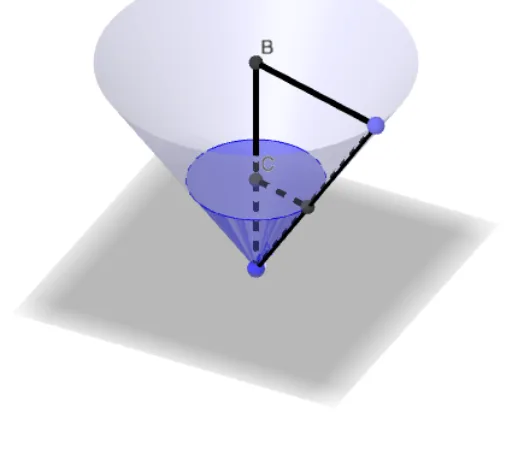
This example demonstrates the cross-section of a cone cut by a plane and calculates the ratio of the wet surface to the total surface area. Key mathematical concepts include cone, plane, cross-section, ratio, and area calculation. Using GeoGebra commands such as Cone and Intersect, students can visually understand geometric construction and ratio calculation. Suitable for high school geometry and probability & statistics courses.
GeoGebra Commands & Parameters
Cone(B, A, R) → a, c, bCone(C, A, r) → d, e, fPoint(c) → FSegment(B, A) → iSegment(B, F) → jSegment(F, A) → kLine(C, j) → mIntersect(m, k) → GSegment(C, G) → n
AI Drawing Prompt Reference
Draw a cone with base center at point A and apex at point B, with base radius R. Then draw another cone with base center at point C and apex at point A, with base radius r. Next, take a point F on the base of the first cone, connect point B to A, then connect point B to F, and finally connect point F to A. Draw a line through point C and point B, which intersects the line connecting point F and A at point G. Finally, draw a line connecting point C and point G.
The prompt above was compiled from the original drawing commands and is for reference only.