
Random Slicing of a Cube with Rotation Compositions
Loading the math board and drawing, please wait…
In collections
intersection: surface-surface, curve-curve
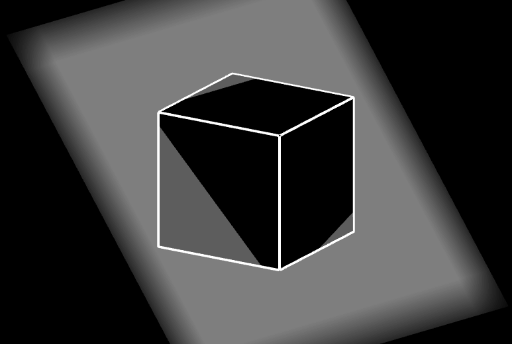
This example demonstrates how a cube can be randomly sliced by a plane to produce intersection shapes, and how compositions of rotations can be used to assemble and compare the resulting polygonal pieces. Key concepts include solid geometry (faces and edges of a cube), plane–solid intersection leading to polygonal cross-sections, and geometric transformations—especially Rotate—to generate consistent compositions from a base configuration. It also uses Centroid and OrthogonalLine to locate rotation-related centers and define helpful perpendicular constructions, while Random introduces variability in the cutting setup to study how the geometry changes across different runs. Construction details: Cube creates the 3D solid; Plane defines the cutting plane; IntersectPath computes the intersection path/curve; Polygon forms the resulting regions such as the faces (e.g., faceABCD, faceADHE, faceABFE, faceBCGF, faceCDHG, faceEFGH). Centroid and OrthogonalLine help determine key points (including intermediate labeled points like I, J, K) and auxiliary lines. Rotate applies the transformations to copy/arrange pieces, with Random and Midpoint supporting the stochastic selection of points and parameters. Suitable for advanced high-school geometry, STEM visualization, and introductory modeling activities focusing on 3D constructions and transformation-based reasoning.
GeoGebra Commands & Parameters
Cube(A, B, C) → a, D, faceCDHG, faceEFGH, arêteAD, arêteAB_{1}, arêteBC_{1}, arêteCD, arêteAE, arêteDH, arêteEH, arêteEF, E, arêteBF, arêteFG, arêteCG, arêteGH, F, G, H, faceABCD, faceADHE, faceABFE, faceBCGFPlane(I, J, K) → pIntersectPath(p, a) → poly1, L, i, j, k, M, N, O, P, Q, f, g, hPolygon(A, L, Q) → t1, q, a_1, lPolygon(M, C, N) → t2, n, m, cPolygon(N, C, D, H, O) → poly2, n_1, c_1, d, h_1, oPolygon(D, A, Q, P, H) → poly3, d_1, a_2, q_1, p_1, h_2Polygon(O, H, P) → t3, p_2, o_1, h_3Polygon(L, M, N, O, P, Q) → poly4, l_1, m_1, n_2, o_2, p_3, q_2Polygon(L, B, F, E, Q) → poly5, l_2, b, f_1, e, q_3Polygon(B, M, N, G, F) → poly6, b_1, m_2, n_3, g_1, f_2Polygon(N, O, G) → t4, g_2, n_4, o_3Polygon(P, Q, E) → t5, e_1, p_4, q_4Polygon(O, P, E, F, G) → poly7, o_4, p_5, e_2, f_3, g_3Polygon(L, M, N, O, P, Q) → poly8, l_3, m_3, n_5, o_5, p_6, q_5Centroid(poly1) → RPolygon(A, B, C, D) → q1, a_3, b_2, c_2, d_2OrthogonalLine(R, p) → axePolygon(A, D, C, K, L) → poly9, a_4, d_3, c_3, k_1, l_4Rotate(bas, (fr1(t - floor(t)) * 360°), axe) → bas'Polygon(L, K, B) → t6, b_3, l_5, k_2Rotate(haut, ((-fr2(t - floor(t))) * 360°), axe) → haut'Rotate(bas, (fr1(t - floor(t)) * 360°), axe) → bas2Rotate(haut, ((-fr2(t - floor(t))) * 360°), axe) → haut2Cube(A, B, C) → r, S, faceCSWV, faceTUVW, arêteAS, arêteAB, arêteBC, arêteCS, arêteAT, arêteSW, arêteTW, arêteTU, T, arêteBU, arêteUV, arêteCV, arêteVW, U, V, W, faceABCS, faceASWT, faceABUT, faceBCVURandom(0, 3) → rdMidpoint(Segment[A, G]) → CROrthogonalLine(CR, Plane[A, B, C]) → sRotate(a, (rd * 90°), s) → a'Rotate(r, (rd * 90°), s) → r'Rotate(Rotate[Rotate[bas', (rd * 90°), s], (fr1(t - floor(t)) * 180°), zAxis], (fr1(t - floor(t)) * 180°), xAxis) → bas''Rotate(Rotate[Rotate[haut', (rd * 90°), s], (fr1(t - floor(t)) * 180°), zAxis], (fr1(t - floor(t)) * 180°), xAxis) → haut''Rotate(Rotate[Rotate[bas2, (rd * 90°), s], (fr1(t - floor(t)) * 180°), zAxis], (fr1(t - floor(t)) * 180°), xAxis) → bas2'Rotate(Rotate[Rotate[haut2, (rd * 90°), s], (fr1(t - floor(t)) * 180°), zAxis], (fr1(t - floor(t)) * 180°), xAxis) → haut2'
AI Drawing Prompt Reference
Create a cube and slice it with a plane defined by three points to generate polygonal cross-sections at the intersections. Form multiple polygon faces including hexagons on the slicing plane and various polygons on the cube's faces. Compute the centroid of these polygons and draw a line perpendicular to the slicing plane through it. Rotate the polygon pieces around this line and then apply composite rotations around spatial axes to create different configurations. Include a second reference cube for comparative analysis.
The prompt above was compiled from the original drawing commands and is for reference only.