
Compositions of Trig & Inverse Trig Functions (1)
Loading the math board and drawing, please wait…
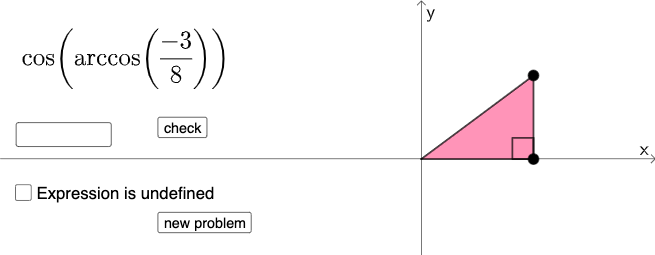
This GeoGebra applet randomly generates compositions of trigonometric and inverse trigonometric functions, displaying the resulting expression, its graph on the coordinate plane, and the domain restrictions. Key mathematical ideas include function composition, inverse functions, trigonometric identities, and domain‑range analysis. Implementation details: Random and RandomElement select a trig function and its inverse; Sequence builds a set of problems; InputBox accepts the user’s answer; Textfield, FractionText, and SurdText render the result; Angle, Polygon, and Segment provide geometric visualization (e.g., on the unit circle); Button triggers a new problem and If checks the answer, showing feedback. Designed for high‑school or introductory college trigonometry, suitable for classroom demonstration, homework, or independent exploration.
GeoGebra Commands & Parameters
Random(1, 6) → aRandom(1, 3) → bRandomElement(nlist) → nSequence(i, i, abs(n), 9, 1) → l1, {3, 4, 5, 6, 7, 8, 9}RandomElement(l1) → cFractionText(d) → text1If(b ≟ 1, asind(d), b ≟ 2, acosd(d), b ≟ 3, atand(d)) → αIf(a ≟ 1, sin(α), a ≟ 6, cot(α), a ≟ 2, cos(α), a ≟ 3, tan(α), a ≟ 4, csc(α), a ≟ 5, sec(α)) → eSurdText(e) → text2If(a ≟ 1, sin(x), a ≟ 6, cot(x), a ≟ 2, cos(x), a ≟ 3, tan(x), a ≟ 4, csc(x), a ≟ 5, sec(x)) → fIf(b ≟ 1, asind(x), b ≟ 2, acosd(x), b ≟ 3, atand(x)) → gTextfield(j) → InputBox1If(a ≟ 1, "sin", a ≟ 6, "cot", a ≟ 2, "cos", a ≟ 3, "tan", a ≟ 4, "csc", a ≟ 5, "sec") → text3If(b ≟ 1, "arcsin", b ≟ 2, "arccos", b ≟ 3, "arctan") → text4Line(A, A + (1, 0)) → mPoint(m) → BPoint(x = x(B)) → CAngle(C, B, A) → βPolygon(A, B, C) → t1, c_1, a_1, b_1Segment(A, B) → pSegment(B, C) → qSegment(C, A) → r
AI Drawing Prompt Reference
The graphic displays a mathematical expression formed by randomly combining trigonometric and inverse trigonometric functions, along with its graph on the coordinate plane and domain restrictions. It also includes geometric visualization using points on the unit circle, line segments, and angle annotations to illustrate relationships. The construction order is: first randomly select function types to form the composite expression; then draw the function graph; finally mark points on the unit circle, connect line segments, and annotate angles to show geometric significance.
The prompt above was compiled from the original drawing commands and is for reference only.