
Composite 3D Figures: Surface Area and Volume Investigation
Loading the math board and drawing, please wait…
In collections
Surface Area and Volume
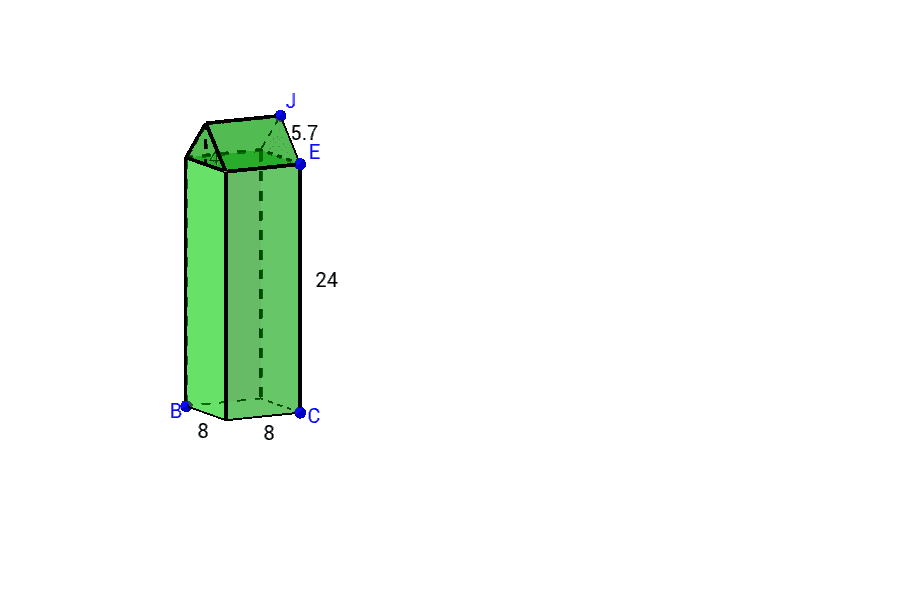
This GeoGebra example investigates the surface area and volume of composite three-dimensional shapes. It demonstrates how complex 3D figures can be deconstructed into simpler polyhedra for measurement. Core mathematical concepts include three-dimensional geometry, surface area and volume calculation, polyhedron decomposition, and spatial reasoning. The construction utilizes GeoGebra commands such as Intersect, Prism, Polygon, Midpoint, and Segment, along with geometric objects like faces (e.g., faceCDFE) and edges (e.g., edgeCE) to build and analyze the composite shapes. It is suitable for high school geometry courses, spatial reasoning units, or introductory contexts involving 3D measurement.
GeoGebra Commands & Parameters
Intersect(xAxis, yAxis) → APoint(xAxis) → BPoint(yAxis) → COrthogonalLine(C, yAxis) → aOrthogonalLine(B, xAxis) → bIntersect(a, b) → DPolygon(C, D, B, A) → poly1, c, d, b_1, a_1OrthogonalLine(C, xOyPlane) → ePoint(e) → EPrism(poly1, E) → f, F, edgeDF, edgeBG, edgeAH, edgeEF, edgeFG, edgeGH, edgeEH, G, H, faceCDFE, faceBDFG, faceABGH, faceACEH, faceEFGH, edgeCEMidpoint(edgeEH) → IOrthogonalLine(I, faceEFGH) → gPoint(g) → JPolygon(J, E, H) → poly2, h, j, e_1Prism(poly2, (-edgeEF)) → i, K, edgeHM, edgeKL, edgeLM, edgeKM, L, M, faceEJKL, faceEHML, faceHJKM, faceKLM, edgeJK, edgeELMidpoint(edgeLM) → NSegment(N, K) → k