
Complex Shape Construction
Loading the math board and drawing, please wait…
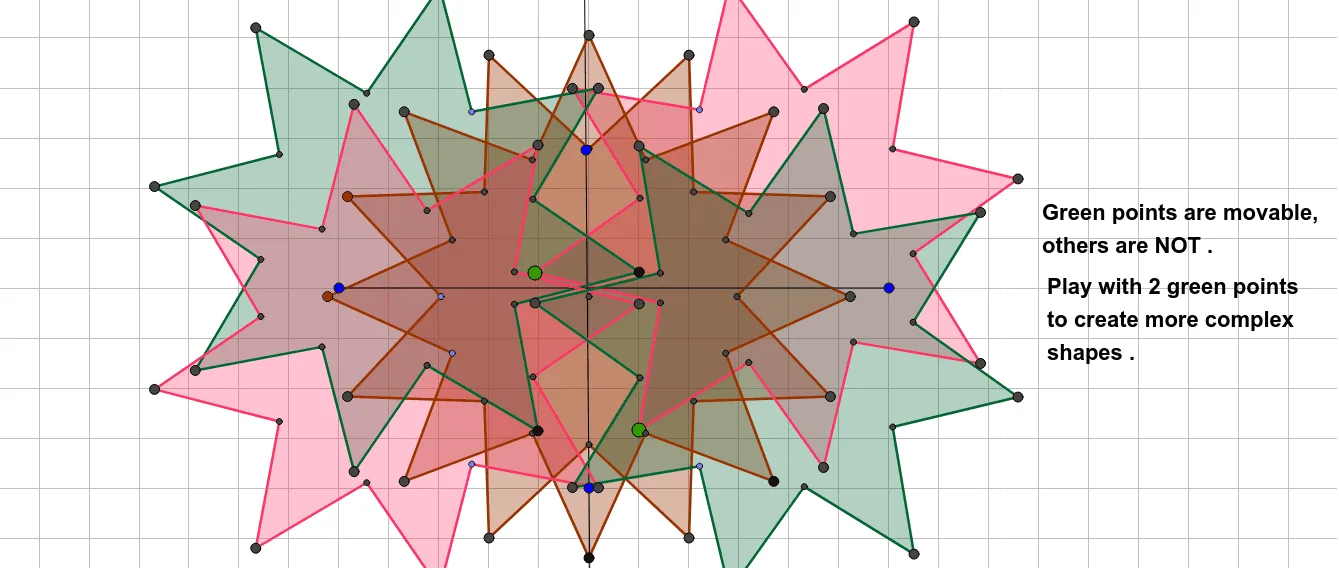
This example demonstrates the construction and manipulation of complex polygons and geometric transformations using GeoGebra. It involves core mathematical concepts such as polygon construction, angle bisectors, rotations, reflections, and coordinate geometry. Key GeoGebra commands and objects used include Polygon, LineBisector, Intersect, Circle, Point, Segment, Rotate, Line, and Mirror. Suitable for high school and above, this example helps learners understand geometric transformations and complex shape constructions.
GeoGebra Commands & Parameters
Polygon(A, B, 8) → poly1, f, D, E, F, G, H, g, h, i, j, k, l, m, CLineBisector(G, H) → nLineBisector(H, A) → pLineBisector(A, B) → qLineBisector(B, C) → rIntersect(n, l) → IIntersect(r, k) → JIntersect(q, j) → KIntersect(p, i) → LIntersect(n, h) → MIntersect(r, g) → NIntersect(q, f) → OIntersect(p, m) → PIntersect(n, p) → QCircle(Q, M) → cPoint(n) → RCircle(Q, R) → dIntersect(d, q, 2) → SIntersect(d, n, 2) → TIntersect(d, r, 1) → UIntersect(d, q, 1) → VIntersect(d, p, 1) → WIntersect(d, r, 2) → ZIntersect(d, p, 2) → A_1Segment(G, Z) → sSegment(Z, F) → tSegment(F, S) → aSegment(S, E) → bSegment(E, A_1) → eSegment(A_1, D) → f_1Segment(T, D) → g_1Segment(T, C) → h_1Segment(U, C) → i_1Segment(U, B) → j_1Segment(V, B) → k_1Segment(V, A) → l_1Segment(W, A) → m_1Segment(H, W) → n_1Segment(R, H) → p_1Segment(R, G) → q_1Polygon(G, Z, B, V, A, W, H, R, F, S, E, A_1, D, T, C, U) → poly2, g_2, u, b_1, v, a_2, w, h_2, r_1, z_1, f_2, s_1, e_1, a_1, d_1, t_1, c_1Point(Circle[B_1, Segment[G, Z]]) → C_1Rotate(C_1 + (Segment[Z, F], 0), Angle[F - Z] + Angle[C_1 - B_1] - Angle[Z - G], C_1) → D_1Rotate(D_1 + (Segment[F, S], 0), Angle[S - F] + Angle[D_1 - C_1] - Angle[F - Z], D_1) → E_1Rotate(E_1 + (Segment[S, E], 0), Angle[E - S] + Angle[E_1 - D_1] - Angle[S - F], E_1) → F_1Rotate(F_1 + (Segment[E, A_1], 0), Angle[A_1 - E] + Angle[F_1 - E_1] - Angle[E - S], F_1) → G_1Rotate(G_1 + (Segment[A_1, D], 0), Angle[D - A_1] + Angle[G_1 - F_1] - Angle[A_1 - E], G_1) → H_1Rotate(H_1 + (Segment[D, T], 0), Angle[T - D] + Angle[H_1 - G_1] - Angle[D - A_1], H_1) → I_1Rotate(I_1 + (Segment[T, C], 0), Angle[C - T] + Angle[I_1 - H_1] - Angle[T - D], I_1) → J_1Rotate(J_1 + (Segment[C, U], 0), Angle[U - C] + Angle[J_1 - I_1] - Angle[C - T], J_1) → K_1Rotate(K_1 + (Segment[U, B], 0), Angle[B - U] + Angle[K_1 - J_1] - Angle[U - C], K_1) → L_1Rotate(L_1 + (Segment[B, V], 0), Angle[V - B] + Angle[L_1 - K_1] - Angle[B - U], L_1) → M_1Rotate(M_1 + (Segment[V, A], 0), Angle[A - V] + Angle[M_1 - L_1] - Angle[V - B], M_1) → N_1Rotate(N_1 + (Segment[A, W], 0), Angle[W - A] + Angle[N_1 - M_1] - Angle[A - V], N_1) → O_1Rotate(O_1 + (Segment[W, H], 0), Angle[H - W] + Angle[O_1 - N_1] - Angle[W - A], O_1) → P_1Rotate(P_1 + (Segment[H, R], 0), Angle[R - H] + Angle[P_1 - O_1] - Angle[H - W], P_1) → Q_1Polygon(A_3, B_2, 8) → poly1_1, f_4, D_2, E_2, F_2, G_2, H_2, g_4, h_4, i_2, j_2, k_2, l_2, m_2, C_2LineBisector(G_2, H_2) → n_2LineBisector(H_2, A_3) → p_2LineBisector(A_3, B_2) → q_2LineBisector(B_2, C_2) → r_3Intersect(n_2, p_2) → Q_2Point(n_2) → R_1Circle(Q_2, R_1) → d_3Intersect(d_3, q_2, 2) → S_1Intersect(d_3, n_2, 2) → T_1Intersect(d_3, r_3, 1) → U_1Intersect(d_3, q_2, 1) → V_1Intersect(d_3, p_2, 1) → W_1Intersect(d_3, r_3, 2) → Z_1Intersect(d_3, p_2, 2) → A_2Segment(G_2, Z_1) → s_3Segment(Z_1, F_2) → t_3Segment(F_2, S_1) → a_5Segment(S_1, E_2) → b_3Segment(E_2, A_2) → e_3Segment(A_2, D_2) → f_5Segment(T_1, D_2) → g_5Segment(T_1, C_2) → h_5Segment(U_1, C_2) → i_3Segment(U_1, B_2) → j_3Segment(V_1, B_2) → k_3Segment(V_1, A_3) → l_3Segment(W_1, A_3) → m_3Segment(H_2, W_1) → n_3Segment(R_1, H_2) → p_3Segment(R_1, G_2) → q_3Polygon(G_2, Z_1, B_2, V_1, A_3, W_1, H_2, R_1, F_2, S_1, E_2, A_2, D_2, T_1, C_2, U_1) → poly2_1, g_3, u_1, b_2, v_1, a_4, w_1, h_3, r_2, z_2, f_3, s_2, e_2, a_3, d_2, t_2, c_2Intersect(f_1, a_1) → I_2Intersect(f_1, a_1) → J_2Rotate(G, 22.5°, Q) → G'Rotate(Z, 22.5°, Q) → Z'Rotate(F, 22.5°, Q) → F'Rotate(S, 22.5°, Q) → S'Rotate(E, 22.5°, Q) → E'Rotate(A_1, 22.5°, Q) → K_2Rotate(D, 22.5°, Q) → D'Rotate(T, 22.5°, Q) → T'Rotate(C, 22.5°, Q) → C'Rotate(U, 22.5°, Q) → U'Rotate(B, 22.5°, Q) → B'Rotate(V, 22.5°, Q) → V'Rotate(A, 22.5°, Q) → A'Rotate(W, 22.5°, Q) → W'Rotate(H, 22.5°, Q) → H'Rotate(R, 22.5°, Q) → R'Polygon(G', Z', B', V', A', W', H', R', F', S', E', K_2, D', T', C', U') → poly2', g', u', b', v', a', w', h', r', z', f', s', e', c_3, d', t', c'Line(L_2, M_2) → i_4Mirror(G_2, i_4) → N_2Mirror(Z_1, i_4) → O_2Mirror(F_2, i_4) → P_2Mirror(S_1, i_4) → R_2Mirror(E_2, i_4) → S_2Mirror(A_2, i_4) → T_2Mirror(D_2, i_4) → U_2Mirror(T_1, i_4) → V_2Mirror(C_2, i_4) → W_2Mirror(U_1, i_4) → Z_2Mirror(B_2, i_4) → B_3Mirror(V_1, i_4) → C_3Mirror(A_3, i_4) → D_3Mirror(W_1, i_4) → E_3Mirror(H_2, i_4) → F_3Mirror(R_1, i_4) → G_3Polygon(N_2, O_2, B_3, C_3, D_3, E_3, F_3, G_3, P_2, R_2, S_2, T_2, U_2, V_2, W_2, Z_2) → poly3, j_4, p_4, q_4, r_4, s_4, t_4, b_4, c_4, o_2, k_4, l_4, m_4, n_4, u_2, v_2, w_2Segment(H_3, I_3) → d_4Mirror(N_2, d_4) → J_3Mirror(O_2, d_4) → K_3Mirror(P_2, d_4) → L_3Mirror(R_2, d_4) → M_3Mirror(S_2, d_4) → N_3Mirror(T_2, d_4) → O_3Mirror(U_2, d_4) → P_3Mirror(V_2, d_4) → Q_3Mirror(W_2, d_4) → R_3Mirror(Z_2, d_4) → S_3Mirror(B_3, d_4) → T_3Mirror(C_3, d_4) → U_3Mirror(D_3, d_4) → V_3Mirror(E_3, d_4) → W_3Mirror(F_3, d_4) → Z_3Mirror(G_3, d_4) → A_4Polygon(J_3, K_3, T_3, U_3, V_3, W_3, Z_3, A_4, L_3, M_3, N_3, O_3, P_3, Q_3, R_3, S_3) → poly3', e_4, q_5, r_5, u_3, v_3, w_3, z_3, s_5, i_5, j_5, k_5, l_5, o_3, m_5, n_5, p_5Mirror(G_2, d_4) → B_4Mirror(Z_1, d_4) → C_4Mirror(F_2, d_4) → D_4Mirror(S_1, d_4) → E_4Mirror(E_2, d_4) → F_4Mirror(A_2, d_4) → G_4Mirror(D_2, d_4) → H_4Mirror(T_1, d_4) → I_4Mirror(C_2, d_4) → J_4Mirror(U_1, d_4) → K_4Mirror(B_2, d_4) → L_4Mirror(V_1, d_4) → M_4Mirror(A_3, d_4) → N_4Mirror(W_1, d_4) → O_4Mirror(H_2, d_4) → P_4Mirror(R_1, d_4) → Q_4Polygon(B_4, C_4, L_4, M_4, N_4, O_4, P_4, Q_4, D_4, E_4, F_4, G_4, H_4, I_4, J_4, K_4) → poly4, t_5, i_6, j_6, k_6, l_6, o_4, m_6, n_6, b_5, c_5, d_5, e_5, f_6, g_6, ı_4, h_6
AI Drawing Prompt Reference
Draw a complex polygon by constructing angle bisectors and rotating lines. Start by drawing an octagon, then find intersections using angle bisectors, construct circles and segments with these intersections, and finally generate new points and segments through rotations to form a complex polygon.
The prompt above was compiled from the original drawing commands and is for reference only.