
Complex Roots by Juan Carlos Ponce Campuzano
Loading the math board and drawing, please wait…
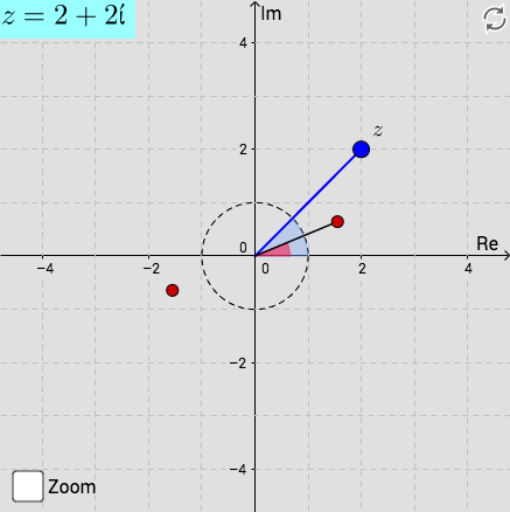
This example demonstrates the roots of complex numbers. It involves fundamental concepts of complex numbers such as modulus and argument. Using GeoGebra commands like Sequence, TableText, and Angle, the construction of complex roots is illustrated. Suitable for high school mathematics education, particularly in complex numbers and geometric transformations.
GeoGebra Commands & Parameters
Angle((1000, 0), (0, 0), Z) → angleZSequence((rZ^(1 / n) * (cos(thetaZ / n + (((2 * k) * π)) / n) + (ί * sin(thetaZ / n + (((2 * k) * π)) / n)))), k, 0, n - 1) → list1Sequence({Element[list1, i]}, i, 3, n) → list3Sequence({Element[list1, i]}, i, 1, n) → list2TableText(list3) → text1Segment((0, 0), Z) → gTableText({{LaTeX[xmax, true, true]}, {LaTeX[xmin, true, true]}, {LaTeX[ymax, true, true]}, {LaTeX[ymin, true, true]}}) → text3Circle((0, 0), 1) → cIf(0 ≤ (Angle * π) < (2 * π), Angle[(1000, 0), (0, 0), Element[list1, 1]], If[(2 * π) ≤ (Angle * π) < (4 * π), Angle[(1000, 0), (0, 0), Element[list1, 2]], Angle[(1000, 0), (0, 0), Element[list1, 3]]]) → αIf(0 ≤ (Angle * π) < (2 * π), Segment[(0, 0), Element[list1, 1]], If[(2 * π) ≤ (Angle * π) < (4 * π), Segment[(0, 0), Element[list1, 2]], Segment[(0, 0), Element[list1, 3]]]) → fTextfield(Angle) → InputBox1Textfield(Modulus) → InputBox2Textfield(user1x) → InputBox3Textfield(user1y) → InputBox4Textfield(user2x) → InputBox5Textfield(user2y) → InputBox6Element(list1, 1) → z_1Element(list1, 2) → z_2