
Complex Numbers with Modulus 1 (MEI FP2 - Page 35, Q23)
Loading the math board and drawing, please wait…
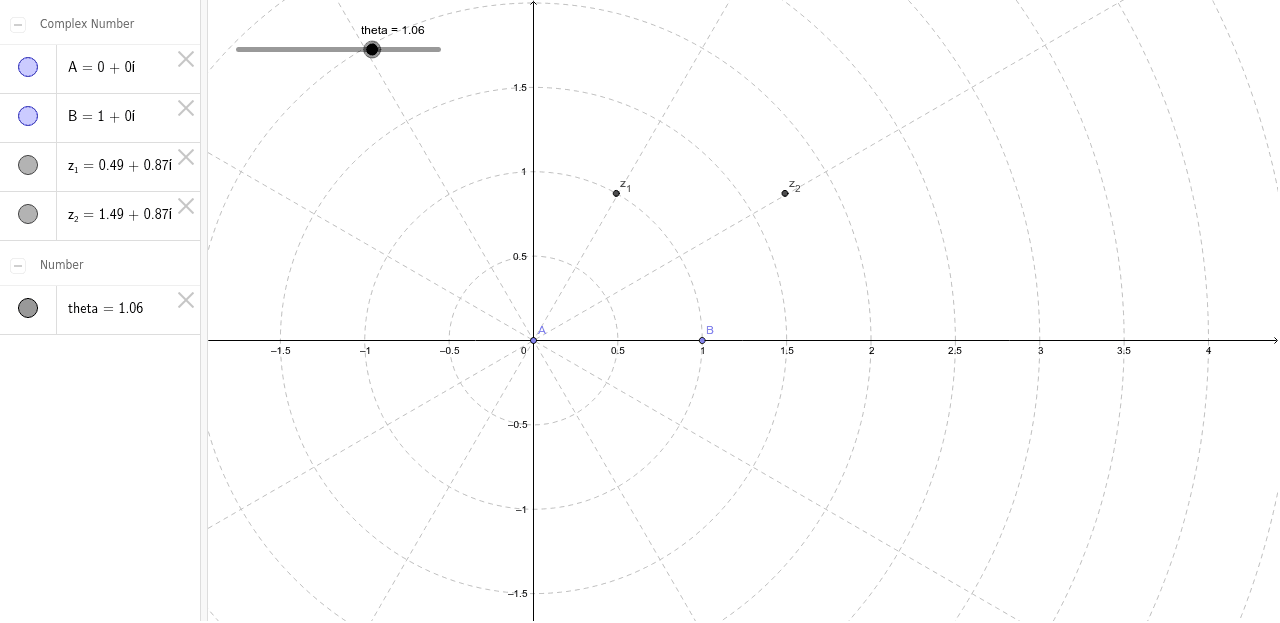
This GeoGebra example demonstrates the geometric behavior of complex numbers with modulus 1 on the unit circle, given two fixed points A and B. It visualizes how a variable complex number z (with |z|=1) interacts with A and B through complex arithmetic, revealing properties such as rotation and distance relationships. Core mathematical concepts include the modulus of a complex number, the unit circle, geometric interpretation of complex addition/subtraction, and locus generation. The construction uses the Point command to define points A, B, and a parameter theta, which generates complex numbers z_1 and z_2 on the unit circle. By dragging theta, users can observe the dynamic changes of z_1 and z_2 and their geometric relation to A and B. This resource is ideal for A-Level (e.g., MEI FP2) or pre-university students studying complex numbers, and serves as an interactive teaching tool for instructors to illustrate the rotational and scaling effects of complex multiplication on the unit circle.
GeoGebra Commands & Parameters
Point(yAxis) → APoint(xAxis) → B
AI Drawing Prompt Reference
Draw a coordinate plane with a unit circle centered at the origin. Place a fixed point on the positive y-axis and another fixed point on the positive x-axis. On the unit circle, create a draggable point controlled by an angle parameter, which generates two complex-number points that always lie on the circle. As the angle is dragged, these two points move along the circumference, showing their geometric relationships (such as distances and rotations) with the two fixed points. Clearly label the unit circle, the fixed points, the moving points, and their connecting segments to illustrate the properties of complex numbers with modulus 1.
The prompt above was compiled from the original drawing commands and is for reference only.