
Complex Integration Demonstration: (z-1)(Conjugate(z)^2+Conjugate(z)+1)
Loading the math board and drawing, please wait…
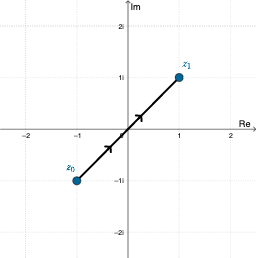
This example demonstrates complex integration by calculating the integral along a specific path in the complex plane. Key mathematical concepts include complex numbers, conjugate numbers, and complex integration. GeoGebra commands such as SelectedIndex, Midpoint, and Distance are used for path selection and distance calculation. Suitable for university mathematics students or those interested in complex analysis.
GeoGebra Commands & Parameters
SelectedIndex(pathNames) → pathIndexMidpoint(A, B) → MDistance(A, B) → distABElement(pathList, pathIndex) → pathSegment(path(0.3), path(0.3 + 0.01)) → arrow1Segment(path(0.6), path(0.6 + 0.01)) → arrow2Element(X, pathIndex) → ReztElement(Y, pathIndex) → ImztDerivative(Rezt, t) → dReztDerivative(Imzt, t) → dImztSelectedIndex(plotNames) → plotIndex
AI Drawing Prompt Reference
Draw a complex-plane setup with a chosen integration path. On this path, select two different parameter positions and place short line segments near the corresponding points to indicate the direction of traversal with two small arrows. Define the real part and imaginary part of the complex integrand along the parametrized path, and include their derivatives with respect to the path parameter. The final scene should show the path, the two direction markers, and the real/imaginary components together with their parameter derivatives to demonstrate the real–imaginary breakdown used in complex integration.
The prompt above was compiled from the original drawing commands and is for reference only.