
Path Integration Visualization of Complex Conjugate Function
Loading the math board and drawing, please wait…
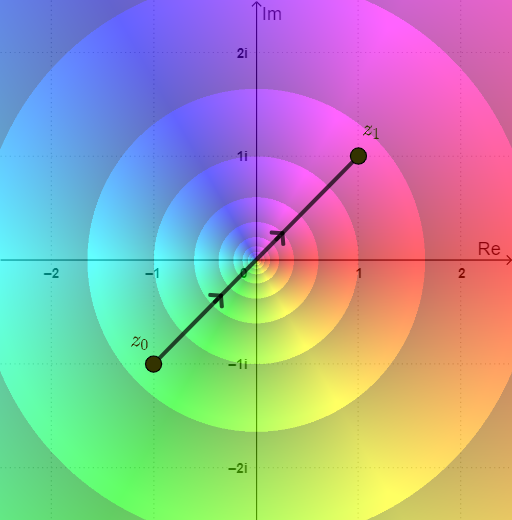
This example demonstrates the path integration of the complex conjugate function conj(z) on the complex plane. Through dynamic GeoGebra graphics, it intuitively shows the mathematical principles of selecting integration paths and separately integrating the real and imaginary parts. Construction highlights: using Derivative command to obtain the integrand's derivative, extracting real and imaginary parts via Re and Im to build ReIntegrand and ImIntegrand, defining integration paths with pathList, and calculating the final integral value with valInt. Suitable for students in advanced mathematics and complex analysis courses, as well as teachers demonstrating integration characteristics of complex conjugate functions.
GeoGebra Commands & Parameters
SelectedIndex(pathNames) → pathIndexMidpoint(A, B) → MDistance(A, B) → distABElement(pathList, pathIndex) → pathSegment(path(0.3), path(0.3 + 0.01)) → arrow1Segment(path(0.6), path(0.6 + 0.01)) → arrow2Element(X, pathIndex) → ReztElement(Y, pathIndex) → ImztDerivative(Rezt, t) → dReztDerivative(Imzt, t) → dImztSelectedIndex(plotNames) → plotIndex
AI Drawing Prompt Reference
Create a visualization of path integration for the complex conjugate function on the complex plane. Show a selected integration path with directional arrows indicating the integration direction. Display the real and imaginary parts of the integrand, along with their derivatives along the path. Include a dropdown to choose different paths and a plot type selector. Annotate the final integral value on the graph. The layout should be clear for educational purposes, emphasizing the separate integration of real and imaginary components.
The prompt above was compiled from the original drawing commands and is for reference only.