
Completing the Square Demo by Kawa Chan
Loading the math board and drawing, please wait…
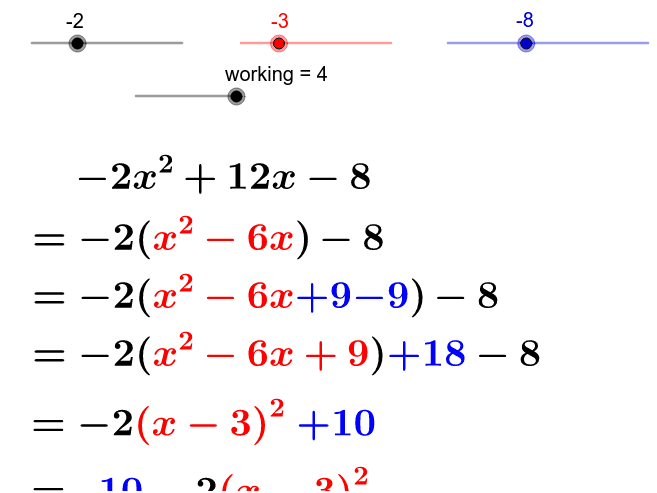
This example dynamically demonstrates the application of completing the square in quadratic functions, visually presenting the changes in vertex coordinates. It involves core mathematical concepts such as quadratic functions, completing the square, vertex form, and analytical geometry. The construction utilizes GeoGebra commands and objects like If, b, c, working, a, signab, absab, abs_c, signc, abs2b, signb, absout, signout, const, signconst, absconst, text5, text6, signconst_2, text7, textabsc, text1, text2, text3, text4, text8, text9, text10, text11, text12, text13. Suitable for high school mathematics teaching to help students understand the properties of quadratic functions and the operation of completing the square.
GeoGebra Commands & Parameters
If(a * b > 0, "+", "-") → signabIf(c ≟ 0, "", If[c > 0, "+", "-"]) → signcIf(b > 0, "+", "-") → signbIf(-1 * a * b^(2) > 0, "+", "-") → signoutIf(-1 * a * b^(2) + c > 0, "+", "-") → signconstIf(-1 * a * b^(2) + c > 0, "", "-") → signconst_2If(c ≠ 0, abs_c, "") → textabsc
AI Drawing Prompt Reference
Draw a quadratic function graph and demonstrate how to complete the square to change the vertex coordinates. Use sliders to adjust the values of a, b, and c, and observe the changes in the vertex coordinates. The graph should include the quadratic function's image, the changes in vertex coordinates, and relevant mathematical symbols and text descriptions.
The prompt above was compiled from the original drawing commands and is for reference only.