
Congruent Triangles Exercise by Kawa Chan
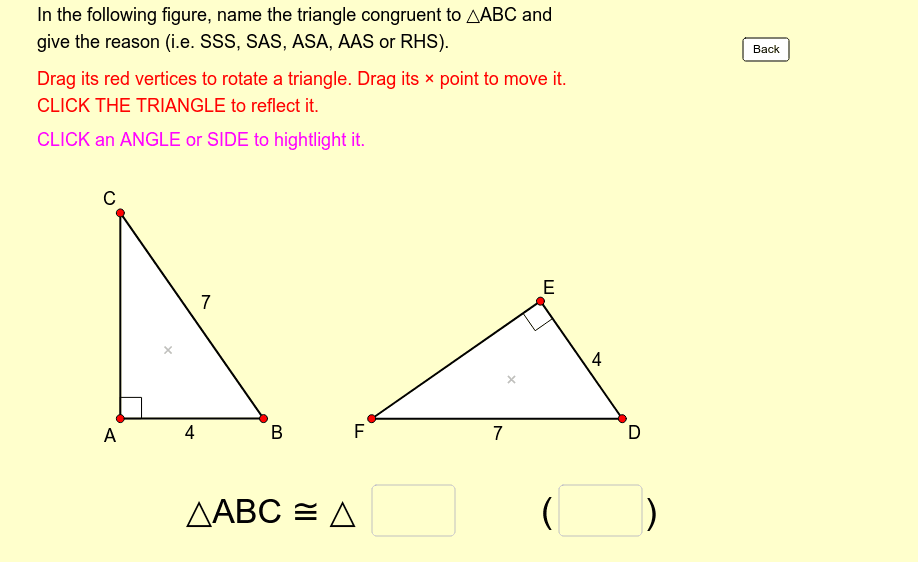
Loading the math board and drawing, please wait…
This example demonstrates how to name congruent triangles with reasons. The triangles are movable, rotatable, and reflectable. Key math concepts include congruence, geometric transformations, and angle measurement. Construction highlights the use of GeoGebra commands such as Polygon, Vector, Angle, Intersect, Textfield, Segment, Midpoint, Rotate, and Vertex. Suitable for middle school and above, focusing on geometric constructions and congruence criteria in mathematics education.
GeoGebra Commands & Parameters
Polygon(A, B, C) → poly1, c, a, bVector(P, A) → uVector(P, B) → vVector(P, C) → wPolygon(A_1, B_1, C_1) → poly1_1, c_1, a_1, b_1Vector(P_1, A_1) → u_1Vector(P_1, B_1) → v_1Vector(P_1, C_1) → w_1Angle(B, A, C) → αAngle(A, C, B) → βAngle(A_1, C_1, B_1) → γAngle(B_1, A_1, C_1) → δIntersect(Circle[Y_0, Side_a], x = x(X_0)) → Z_0, LPolygon(X_0, Y_0, Z_0) → poly2, z_0, x_0, y_0Textfield(text13) → Ans1Textfield(text14) → Ans2Segment(D, E) → rMidpoint(Segment[Intersect[Circle[A, r], b], Intersect[Circle[A, r], c]]) → FMidpoint(Segment[Intersect[Circle[C, r], a], Intersect[Circle[C, r], b]]) → GMidpoint(Segment[Intersect[Circle[A_1, r], b_1], Intersect[Circle[A_1, r], c_1]]) → HMidpoint(Segment[Intersect[Circle[C_1, r], a_1], Intersect[Circle[C_1, r], b_1]]) → IAngle(A_1, B_1, C_1) → εAngle(C, B, A) → ζMidpoint(Segment[Intersect[Circle[B, r], a], Intersect[Circle[B, r], c]]) → JMidpoint(Segment[Intersect[Circle[B_1, r], a_1], Intersect[Circle[B_1, r], c_1]]) → KRotate(Polygon[Mirror[X_0, x = 0], Mirror[Y_0, x = 0], Mirror[Z_0, x = 0]], 2.1790419057051063, (5.011056281987284, 4.704101305477666)) → poly3Vertex(poly3, 1) → X_1Vertex(poly3, 2) → Y_1Vertex(poly3, 3) → Z_1