
Completing Tables with Equations by Matthew Zeigler
Loading the math board and drawing, please wait…
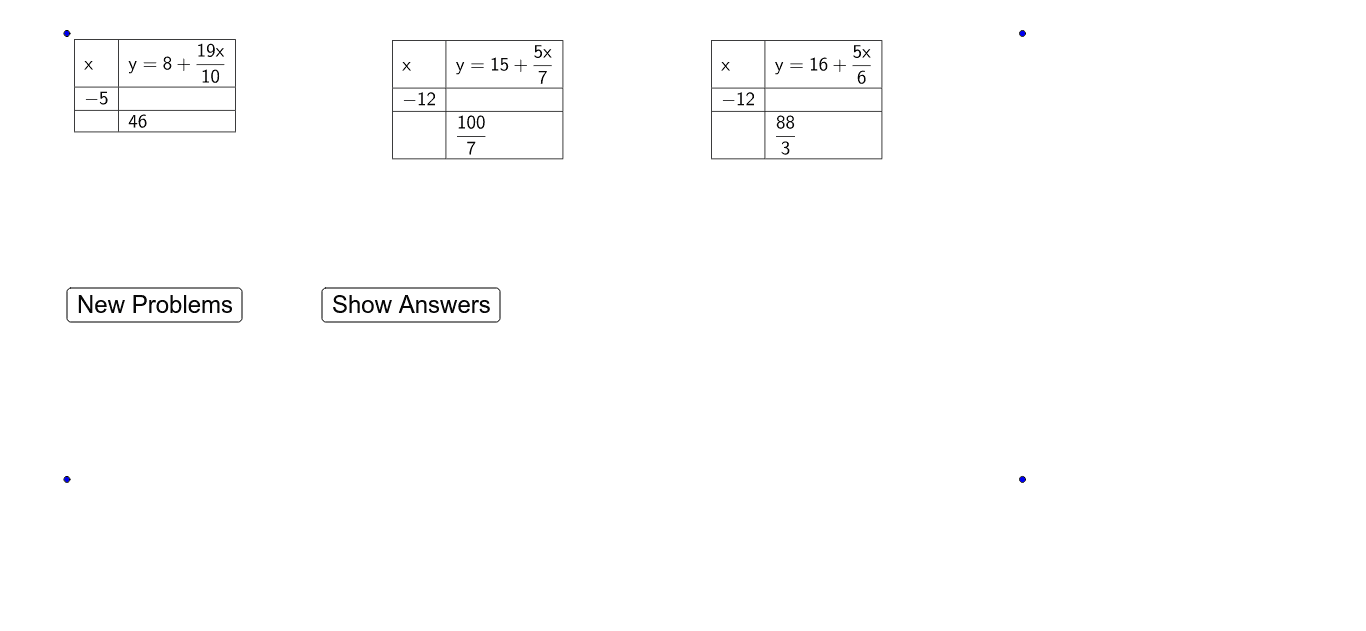
This example demonstrates how to use equations in GeoGebra to complete numerical tables. Core math concepts include equations, geometric distribution, sequences, and series. Construction highlights the use of commands like RemoveUndefined, Element, Random, Text, If, FractionText, TableText, and objects such as buttons and tables to generate random data and populate tables interactively. Suitable for middle school and above, focusing on equation application and data handling skills.
GeoGebra Commands & Parameters
RemoveUndefined(Sequence[(-21 + i)^(2) / (-21 + i), i, 1, 41]) → numersXElement(numersX, Random[21, 40]) → numerX1Element(numersX, Random[21, 40]) → numerX2Element(numersX, Random[21, 40]) → numerX3Element(numersX, Random[21, 40]) → numerX4Element(numersX, Random[21, 40]) → numerX5Element(numersX, Random[21, 40]) → numerX6Random(-20, 20) → X1ARandom(-20, 20) → X2ARandom(-20, 20) → X3ARandom(-20, 20) → X4ARandom(-20, 20) → X5ARandom(-20, 20) → X6ARandom(-20, 20) → X1BRandom(-20, 20) → X2BRandom(-20, 20) → X3BRandom(-20, 20) → X4BRandom(-20, 20) → X5BRandom(-20, 20) → X6BRandom(0, 20) → b1Random(0, 20) → b2Random(1, 10) → denomX1Random(0, 20) → b3Random(1, 10) → denomX2Random(0, 20) → b4Random(1, 10) → denomX3Random(0, 20) → b5Random(1, 10) → denomX4Random(0, 20) → b6Random(1, 10) → denomX5Random(1, 10) → denomX6Text(abs(numerX2)) → forTextNumber2Text(abs(numerX3)) → forTextNumber3Text(abs(numerX4)) → forTextNumber4Text(abs(numerX5)) → forTextNumber5Text(abs(numerX6)) → forTextNumber6If(numerX1 < 0, " - ", " + ") → signX1If(numerX2 < 0, " - ", " + ") → signX2If(numerX3 < 0, " - ", " + ") → signX3If(numerX4 < 0, " - ", " + ") → signX4If(numerX5 < 0, " - ", " + ") → signX5If(numerX6 < 0, " - ", " + ") → signX6Text(abs(numerX1)) → forTextNumber1Text(denomX1) → forTextDenomX1Text(denomX2) → forTextDenomX2Text(denomX3) → forTextDenomX3Text(denomX4) → forTextDenomX4Text(denomX5) → forTextDenomX5Text(denomX6) → forTextDenomX6If(b1 < 0, " - ", " ") → signB1If(b2 < 0, " - ", " ") → signB2If(b3 < 0, " - ", " ") → signB3If(b4 < 0, " - ", " ") → signB4If(b5 < 0, " - ", " ") → signB5If(b6 < 0, " - ", " ") → signB6Text(X1A) → forTextX1AText(X2A) → forTextX2AText(X3A) → forTextX3AText(X4A) → forTextX4AText(X5A) → forTextX5AText(X6A) → forTextX6AText(X1B) → forTextX1BText(X2B) → forTextX2BText(X3B) → forTextX3BText(X4B) → forTextX4BText(X5B) → forTextX5BText(X6B) → forTextX6BFractionText(y1B) → forTexty1BFractionText(abs(b1)) → forTextb1FractionText(abs(b2)) → forTextb2FractionText(abs(b3)) → forTextb3FractionText(abs(b4)) → forTextb4FractionText(abs(b5)) → forTextb5FractionText(abs(b6)) → forTextb6FractionText(outSide1) → forTextOutSide1FractionText(outSide2) → forTextOutSide2FractionText(outSide3) → forTextOutSide3FractionText(outSide4) → forTextOutSide4FractionText(outSide6) → forTextOutSide6FractionText(outSide5) → forTextOutSide5FractionText(y1A) → forTexty1AFractionText(y2A) → forTexty2AFractionText(y2B) → forTexty2BFractionText(y3A) → forTexty3AFractionText(y3B) → forTexty3BFractionText(y4A) → forTexty4AFractionText(y4B) → forTexty4BFractionText(y5A) → forTexty5AFractionText(y5B) → forTexty5BFractionText(y6A) → forTexty6AFractionText(y6B) → forTexty6BIf(showAnswers ≟ true, forTexty1A, " ") → B2If(showAnswers ≟ true, forTextX1B, " ") → A3If(showAnswers ≟ true, forTexty2A, " ") → E2If(showAnswers ≟ true, forTexty3A, " ") → H2If(showAnswers ≟ true, forTexty4A, " ") → K2If(showAnswers ≟ true, forTexty5A, " ") → N2If(showAnswers ≟ true, forTexty6A, " ") → Q2If(showAnswers ≟ true, forTextX2B, " ") → D3If(showAnswers ≟ true, forTextX3B, " ") → G3If(showAnswers ≟ true, forTextX4B, " ") → J3If(showAnswers ≟ true, forTextX5B, " ") → M3If(showAnswers ≟ true, forTextX6B, " ") → P3TableText({{A1, B1}, {A2, B2}, {A3, B3}}, "|_") → Table1TableText({{G1, H1}, {G2, H2}, {G3, H3}}, "|_") → Table3TableText({{J1, K1}, {J2, K2}, {J3, K3}}, "|_") → Table4TableText({{M1, N1}, {M2, N2}, {M3, N3}}, "|_") → Table5TableText({{P1, Q1}, {P2, Q2}, {P3, Q3}}, "|_") → Table6TableText({{D1, E1}, {D2, E2}, {D3, E3}}, "|_") → Table2
AI Drawing Prompt Reference
Create an interactive math practice table with six rows of randomly generated numerical data. Each row displays a fraction expression with a random integer numerator (possibly signed) and a random positive integer denominator, accompanied by a text box showing the absolute value. Place a button beside the table to regenerate random data. The layout should be clear and suitable for middle school students practicing equations and sequences.
The prompt above was compiled from the original drawing commands and is for reference only.