
Complementary Angles Dynamic Exploration
Loading the math board and drawing, please wait…
In collections
Introduction to Angles
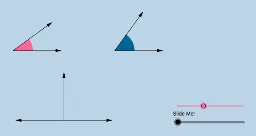
This example dynamically illustrates the concept of complementary angles without angle measurements, engaging students visually. It covers core math concepts like complementary angle definitions and geometric transformations. Constructed using GeoGebra commands such as Circle, Segment, Point, Ray, Midpoint, OrthogonalLine, Intersect, Rotate, Angle, Vector, CircleSector, Dilate, and Translate. Suitable for high school mathematics education to help students understand the geometric meaning and properties of complementary angles.
GeoGebra Commands & Parameters
Circle(A, B) → cSegment(A, B) → aPoint(b) → CRay(A, C) → dPoint(d) → DCircle(D, a) → eMidpoint(A, D) → EOrthogonalLine(E, b) → fPoint(f) → FRay(E, F) → gPoint(g) → GIntersect(c, b) → H, IIntersect(e, b) → J, KRotate(I, α, A) → I'Angle(I, A, I') → βRotate(K, π / 2 - β, D) → K'Angle(K, D, K') → γCircle(A, (0.4 * a)) → hCircle(D, (0.4 * a)) → kSegment(A, I') → iSegment(D, K') → jIntersect(h, b, 2) → LIntersect(h, i, 1) → MIntersect(k, b, 2) → NIntersect(k, j, 1) → OCircle(G, a) → pIntersect(p, l, 2) → PIntersect(p, l, 1) → QIntersect(p, g, 1) → RVector(G, P) → uVector(G, R) → vCircleSector(A, L, M) → qCircleSector(D, N, O) → rDilate(A, If[0 < m ≤ 1, 1 - m, 0], G) → A'Vector(A, A') → wTranslate(q, w) → q'Rotate(q', If[1 < m ≤ 2, ((m - 1) * (π / 2 - α)), π / 2 - α], G) → q''Dilate(D, If[2 < m ≤ 3, 3 - m, 0], G) → D'Vector(D, D') → nTranslate(r, n) → r'Vector(G, Q) → sAngle(R, G, Q) → δVector(A, I') → u_1Vector(A, I) → tVector(D, K) → v_1Vector(D, K') → w_1
AI Drawing Prompt Reference
Create a dynamic illustration of complementary angles. Start by drawing a circle and a segment, then construct complementary angles through rotation and intersection. Next, draw two more circles and segments, and use rotation and scaling to demonstrate the dynamic effect of complementary angles. Finally, use translation and rotation to further illustrate the transformations of complementary angles.
The prompt above was compiled from the original drawing commands and is for reference only.