
Complementary and Supplementary Angles
Loading the math board and drawing, please wait…
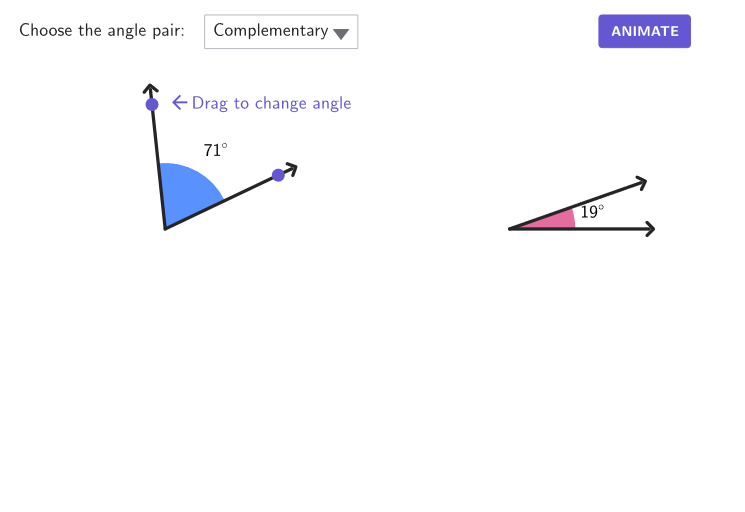
This example demonstrates how to understand complementary and supplementary angles through geometric construction. The key mathematical concepts include angle definitions, complementary and supplementary angle calculations. Construction involves using GeoGebra commands like Polygon, Angle, Circle, etc. Suitable for students in grades 6-8 for geometry learning or classroom demonstration.
GeoGebra Commands & Parameters
Polygon(I, J, K, L) → q1, i, j, k, lVector(C, V) → uPointIn(q1) → ACircle(A, 4) → cPoint(c) → BSegment(A, B) → s11OrthogonalLine(A, s11) → perpLineIntersect(c, perpLine, 2) → MCOMArc(c, B, MCOM) → complArcMirror(B, A) → MSUPArc(c, B, MSUP) → supplArcPoint(If[choice ≤ 2, complArc, supplArc]) → B'Angle(B, A, B') → αRotate(D, If[choice ≤ 2, 90° - α, 180° - α], C) → D'Point(s11) → ECircleSector(A, E, B') → dSegment(C, D) → s21Segment(A, B') → s12Angle(D, C, D') → βSegment(C, D') → s22Point(s21) → FCircleSector(C, F, D') → eVector(A, V) → vTranslate(e, Vector[(u * transSli2)]) → e'AngularBisector(B, A, B') → labLin1AngularBisector(D, C, D') → labLin2Intersect(e, labLin2) → L2,Translate(C, u) → C'Translate(C, u) → C'_{1}Translate(C, Vector[(transSli2 * u)]) → C'_{2}Translate(D, Vector[(transSli2 * u)]) → D'_{1}Segment(C'_{2}, D'_{1}) → s21'Translate(C, Vector[(transSli2 * u)]) → C'_{3}Translate(D', Vector[(transSli2 * u)]) → D''Segment(C'_{3}, D'') → s22'Translate(A, Vector[(transSli1 * v)]) → A'Translate(B', Vector[(transSli1 * v)]) → B''Segment(A', B'') → s12'Translate(A, Vector[(transSli1 * v)]) → A'_{1}Translate(B, Vector[(transSli1 * v)]) → B'_{1}Segment(A'_{1}, B'_{1}) → s11'Translate(d, Vector[(transSli1 * v)]) → d'Angle(D'', V, B'_{1}) → angRotate(d', (rotAng * rotSli), V) → d''Rotate(A'_{1}, (rotAng * rotSli), V) → GRotate(B'_{1}, (rotAng * rotSli), V) → HSegment(G, H) → s11''Rotate(A', (rotAng * rotSli), V) → A''Rotate(B'', (rotAng * rotSli), V) → B'''Segment(A'', B''') → s12''Polygon(A, E, 4) → squa1, f, g, h, m, M, NPolygon(C, F, 4) → squa2, n, p, q, r, O, PTranslate(squa1, Vector[(transSli1 * v)]) → squa1'Rotate(squa1', (rotAng * rotSli), V) → squa1''Translate(squa2, Vector[(transSli2 * u)]) → squa2'Translate(Polygon[C, F, 4], Vector[(transSli1 * u)]) → squaBlackCircle(A, 4.3) → cExtMirror(B, cExt) → B'_{2}Segment(B, B'_{2}) → sv11Mirror(B', cExt) → B''_{1}Segment(B', B''_{1}) → sv12Translate(B, Vector[(transSli1 * u)]) → B'_{3}Translate(B', Vector[(transSli1 * u)]) → B''_{2}Translate(B', Vector[(transSli1 * v)]) → B''_{3}Translate(B''_{1}, Vector[(transSli1 * v)]) → QSegment(B''_{3}, Q) → sv12'Translate(B, Vector[(transSli1 * v)]) → B'_{4}Translate(B'_{2}, Vector[(transSli1 * v)]) → RSegment(B'_{4}, R) → sv11'Rotate(B'_{4}, (rotAng * rotSli), V) → SRotate(R, (rotAng * rotSli), V) → R'Segment(S, R') → sv11''Rotate(B''_{3}, (rotAng * rotSli), V) → TRotate(Q, (rotAng * rotSli), V) → Q'Segment(T, Q') → sv12''circlePixels(B, 7 + (7 * pulsing), Corner[1], Corner[3], Corner[5]) → pulsingObject1circlePixels(B', 7 + (7 * pulsing), Corner[1], Corner[3], Corner[5]) → pulsingObject2Rotate(B, α - 15°, A) → BF
AI Drawing Prompt Reference
Draw a circle with center C and radius 4. Choose a point A on the circle and draw a line segment AC. Construct a perpendicular line to AC, and let it intersect the circle at point MCOM. Draw an arc with center B and radius BMCOM to represent the supplementary angle. Draw two arcs with centers B and A respectively to represent the supplementary and complementary angles. Choose a point B' on the arc corresponding to the selected angle, and draw angle α between A and B'. Rotate point D to form angle β corresponding to angle α. Draw the angle bisectors of angles α and β, and mark their intersection point L2.
The prompt above was compiled from the original drawing commands and is for reference only.