
Comparing Square and Rhombus Area
Loading the math board and drawing, please wait…
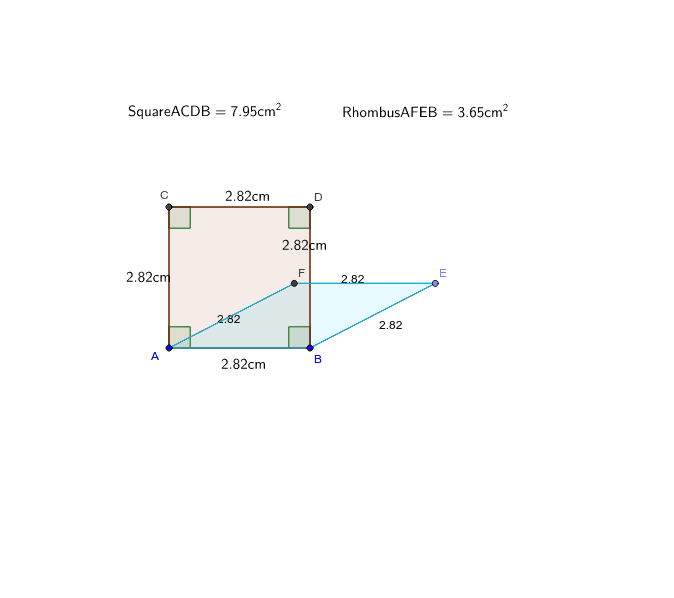
This example demonstrates the comparison of areas between a square and a rhombus when they have equal side lengths. Key math concepts include area calculation, geometric properties of rhombuses and squares, and inequalities. It is constructed using GeoGebra commands such as Segment, Circle, OrthogonalLine, Intersect, Polygon, Angle, Distance, Point, and Line. Suitable for middle school and above, it helps students understand the relationship between areas of geometric shapes and the application of inequalities.
GeoGebra Commands & Parameters
Segment(A, B) → aCircle(B, A) → cCircle(A, B) → dOrthogonalLine(A, a) → bOrthogonalLine(B, a) → eIntersect(d, b, 2) → CIntersect(c, e, 2) → DSegment(C, D) → fSegment(C, A) → gSegment(D, B) → hPolygon(A, C, D, B) → poly1, a_1, c_1, d_1, b_1Angle(B, A, C) → αAngle(A, C, D) → βAngle(C, D, B) → γAngle(D, B, A) → δDistance(C, D) → distanceCDDistance(D, B) → distanceDBDistance(B, A) → distanceBADistance(A, C) → distanceACPoint(c) → ESegment(B, E) → iLine(A, i) → jLine(E, a) → kIntersect(j, k) → FSegment(A, F) → lSegment(F, E) → mDistance(l, i) → nPolygon(A, F, E, B) → poly2, a_2, f_1, e_1, b_2
AI Drawing Prompt Reference
Draw a square and a rhombus with equal side lengths. Start by drawing a side and two circles centered at the endpoints of this side. Find the intersections of these circles with perpendicular lines to the side. Connect these points to form the rhombus. Then draw a square with the same side length. Compare the areas of the two shapes and represent their relationship with an inequality.
The prompt above was compiled from the original drawing commands and is for reference only.