
Comparing Size by Cut and Paste Q1
Loading the math board and drawing, please wait…
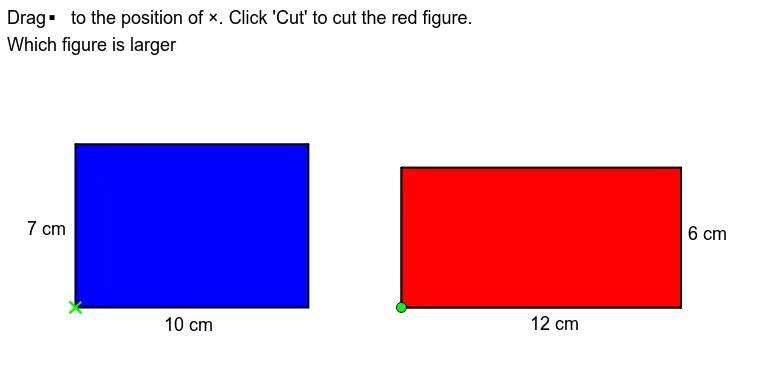
① This example demonstrates how to compare the sizes of two polygons (e.g., triangles or quadrilaterals) through a cut-and-paste visual approach, showing that area is preserved under rigid transformations. ② Core mathematical concepts include area comparison, dissection and reassembly, area conservation, and properties of polygon areas. ③ Construction details: Based on the construction summary, the GeoGebra commands used include Polygon, If, Point, Rotate, and Translate, creating multiple polygon objects (poly1 to poly7) and their copies, with rotations and translations to simulate cutting and pasting, and conditional objects (AonB, ConD) to control the comparison steps. ④ Suitable for upper elementary to middle school students, this interactive model aids in teaching geometric area concepts and can serve as a template for teachers to build dynamic lessons.
GeoGebra Commands & Parameters
Polygon((0, 0), (10, 0), (10, 7), (0, 7)) → poly3, poly3_1, poly3_2, poly3_3, poly3_4Polygon((14, 0), (26, 0), (26, 6), (14, 6)) → poly1, a, b, c, dPolygon(A, A + (12, 0), A + (12, 6), A + (0, 6)) → poly2, poly2_1, poly2_2, poly2_3, poly2_4If(A ≟ B, true, false) → AonBPolygon((0, 0), (10, 0), (10, 6), (0, 6)) → poly4, poly4_1, poly4_2, poly4_3, poly4_4Point(CircleArc[(5, 1), (10, 6), (0, 6)]) → CRotate(Polygon[(10, 0), (12, 0), (12, 6), (10, 6)], Angle[(10, 6), (5, 1), C], (5, 1)) → poly5Rotate(Segment[(10, 0), (12, 0)], Angle[(10, 6), (5, 1), C], (5, 1)) → poly5_1Rotate(Segment[(12, 0), (12, 6)], Angle[(10, 6), (5, 1), C], (5, 1)) → poly5_2Rotate(Segment[(12, 6), (10, 6)], Angle[(10, 6), (5, 1), C], (5, 1)) → poly5_3Rotate(Segment[(10, 0), (10, 6)], Angle[(10, 6), (5, 1), C], (5, 1)) → poly5_4If(C ≟ D, true, false) → ConDPolygon((0, 6), (6, 6), (6, 7), (0, 7)) → poly6, poly6_1, poly6_2, poly6_3, poly6_4Polygon(E, E + (6, 0), E + (6, 1), E + (0, 1)) → poly7, poly7_1, poly7_2, poly7_3, poly7_4If(E ≟ F, true, false) → EonFTranslate(Polygon[(0, 0), (10, 0), (10, 6), (0, 6)], Vector[(0, 0), (14 * t, 0)]) → poly8Translate((0, 6), Vector[(0, 0), (24 * t, 0)]) → GRotate(G + (6, 0), (-90)° * t, G) → HPolygon(G, H, I, J) → poly9, poly9_1, poly9_2, poly9_3, poly9_4Translate((6, 6), Vector[(0, 0), (19 * t, 0)]) → KRotate(K + (4, 0), (-90)° * t, K) → LPolygon(K, L, M, N) → poly10, poly10_1, poly10_2, poly10_3, poly10_4Translate(Polygon[(0, 0), (10, 0), (10, 6), (0, 6)], Vector[(0, 0), (14 * t, 0)]) → poly11Polygon(O, O + (2, 0), O + (2, 1), O + (0, 1)) → poly12, poly12_4, poly12_1, poly12_2, poly12_3Translate(O, Vector[t * Vector[O, (25, 2)]]) → O'Rotate(O' + (2, 0), (-90)° * t, O') → PPolygon(O', P, Q, R) → poly13, poly13_3, poly13_4, poly13_1, poly13_2
AI Drawing Prompt Reference
Create an interactive geometry diagram showing area comparison of two polygons through cut-and-paste. Place a rectangle on the left and another on the right with different heights. On the left rectangle, use a movable point to control rotation of a vertical strip around a pivot, simulating cutting. Meanwhile, use sliders to translate parts of the rectangle horizontally and rotate them to form new shapes, which can be pasted onto another figure, visually demonstrating that area is preserved. Include multiple polygons whose positions and rotations are controlled by sliders, and add conditional checks for point coincidences to show comparison steps. The layout should be clear for educational purposes.
The prompt above was compiled from the original drawing commands and is for reference only.