
Comparing Ratios with a Water Dye Simulation
Loading the math board and drawing, please wait…
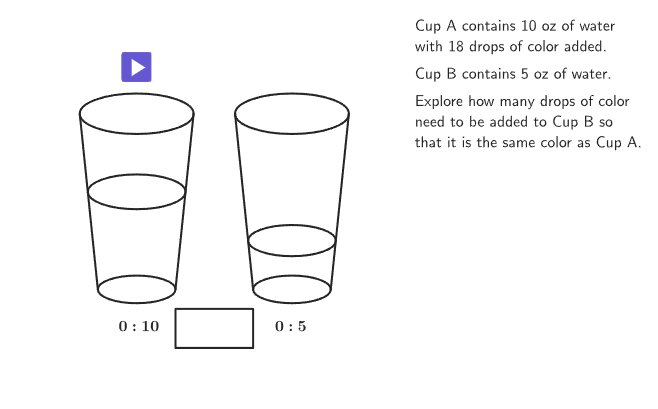
This example demonstrates how to use ratios to simulate water dye color mixing. The key mathematical concepts involve proportions and proportion equations, along with geometric principles like similar triangles. Construction uses GeoGebra commands such as Shuffle, Element, and Corner to build the visual representation. It is suitable for students in grades 6-8 to understand proportional reasoning in real-world applications and develop geometric intuition.
GeoGebra Commands & Parameters
Shuffle(Sequence[2, 16] \ {11, 13, 17, 19}) → randomX, {10, 8, 2, 7, 12, 4, 15, 3, 5, 6, 16, 9, 14}Element(randomX, Mod[countQuestion, Length[randomX]] + 1) → XShuffle(KeepIf[Mod[ii, X] ≟ 0 ∨ Mod[X, ii] ≟ 0, ii, Sequence[2, 16] \ {X}]) → randomY, {5, 2}Element(randomY, 1) → YShuffle(Sequence[6]) → randomColor, {5, 3, 4, 1, 2, 6}Element(randomColor, Mod[countQuestion, Length[randomColor]] + 1) → colorCorner(5) → AppSizeShuffle(KeepIf[IsInteger[(ii * Y / X)] ∧ (ii * Y / X) ≤ 20, ii, Sequence[2, 20]]) → randoma, {18, 2, 6, 4, 14, 20, 12, 16, 10, 8}Segment(Vertex[glass1Base], Vertex[glass1Top]) → glass1LeftMirror(glass1Left, yAxis) → glass1RightTranslate(glass1Left, displacement) → glass2leftTranslate(glass1Right, displacement) → glass2RightTranslate(glass1Base, displacement) → glassBase2Translate(glass1Top, displacement) → glassTop2Translate(liquidheight2, displacement) → liquidheight2InPlaceElement(randoma, 1) → aPolygon({(-1, 0), (1, 0), Intersect[glass1Right, Line[(0, h1), (1, h1)]], Intersect[glass1Left, Line[(0, h1), (1, h1)]]}) → q1Translate(c, displacement) → c'Translate(e, displacement) → e'Polygon({Translate[(-1, 0), displacement], Translate[(1, 0), displacement], Intersect[glass2Right, Line[(0, h2), (1, h2)]], Intersect[glass2left, Line[(0, h2), (1, h2)]]}) → q2Min(X, Y) → smallerPolygon({(1, -1.5), (2, -1.5), (2, -0.5), (1, -0.5)}) → q3Polygon({(2, -1.5), (2, -0.5), (3, -0.5), (3, -1.5)}) → q4Polygon({(1, -1.5), (1, -0.5), (3, -0.5), (3, -1.5)}) → q5If(dropCount2 < b, "\text{Too light...}", dropCount2 ≟ b, "\text{Match!}", "\text{Too dark...}") → feedbackText(feedback, (2, -1.5), true, true, 0, -1) → feedbackPositionedexpandQuad(PulsC1, PulsC2, PulsC3, PulsC4, (7 * pulsing), Corner[1], Corner[3], Corner[5]) → pulsingObject
AI Drawing Prompt Reference
Draw a geometric representation of water dye mixing to demonstrate ratio concepts. Include two glasses with colored liquids, showing proportions through geometric principles and similar triangles. Randomly generate colors and ratios, using shapes to depict liquid heights and relationships, with feedback indicating if the mixture is too light, matches, or is too dark.
The prompt above was compiled from the original drawing commands and is for reference only.