
Comparing Fractions with Number Lines and Circles
Loading the math board and drawing, please wait…
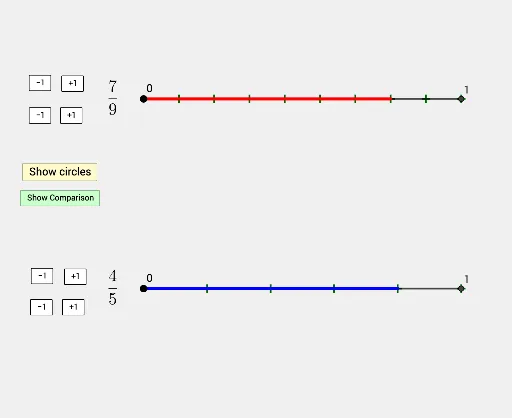
① This example demonstrates how to compare two fractions visually using both a number line and circular sectors, providing dual representations of fractional values. ② The core mathematical concepts include fraction meaning, equivalent fractions, representation on a number line, and the part-whole relationship shown by circle sectors, fostering number sense and comparison strategies. ③ Construction highlights: using GeoGebra commands such as Line, Point, Circle, OrthogonalLine, Intersect, Segment, Sequence, and CircleSector, the applet builds a number line with marked intervals and circular sectors; sliders or input fields (e.g., frac1num, frac1denom, frac2num, frac2denom) allow dynamic adjustment of numerators and denominators, automatically updating the corresponding segments and sectors for real-time comparison. ④ Suitable for upper elementary to middle school students learning fraction concepts and comparison, and useful for classroom demonstrations or self-directed exploration to connect fractions with geometric representations.
GeoGebra Commands & Parameters
Line(A, yAxis) → fPoint(f) → BPoint(f) → CCircle(B, linelength) → cCircle(C, linelength) → dOrthogonalLine(B, f) → gOrthogonalLine(C, f) → hIntersect(c, g, 1) → DIntersect(d, h, 1) → ESegment(B, D) → iSegment(C, E) → jSequence(B + ((i * linelength / frac1denom), 0), i, 1, frac1denom) → frac1intervalsSequence(C + ((i * linelength / frac2denom), 0), i, 1, frac2denom) → frac2intervalsSegment(B, B + ((frac1num * linelength / frac1denom), 0)) → frac1segmentSegment(C, C + ((frac2num * linelength / frac2denom), 0)) → frac2segmentSegment(F, G) → kLine(H, f) → lPoint(l) → IPoint(l) → JCircle(I, circlesize) → eCircle(J, circlesize) → pIntersect(e, l, 2) → KIntersect(p, l, 2) → LSegment(I, K) → mSegment(J, L) → nSequence(Segment[Rotate[I, (i * angle1rotation), I], Rotate[K, (i * angle1rotation), I]], i, 1, frac1denom) → frac1wedgesSequence(Segment[Rotate[J, (i * angle2rotation), J], Rotate[L, (i * angle2rotation), J]], i, 1, frac2denom) → frac2wedgesCircleSector(I, K, Rotate[K, (frac1num * angle1rotation), I]) → frac1SectorCircleSector(J, L, Rotate[L, (frac2num * angle2rotation), J]) → frac2Sector
AI Drawing Prompt Reference
Draw a horizontal number line with a common starting point. Create two circular, sector-based representations of two fractions: on the left, form a circle and divide its angle into a number of equal parts equal to the first denominator, then display a sector spanning only the first numerator parts. On the right, repeat the same construction with a second circle using the second numerator and denominator. Connect the start point to the points on the number line that correspond to the numerator portions using line segments, and mark the denominator’s equal sub-intervals on the number line so that each fraction’s sector opening matches the corresponding marked portion for easy visual comparison.
The prompt above was compiled from the original drawing commands and is for reference only.