
Comparing Fractions by Amsavalli
Loading the math board and drawing, please wait…
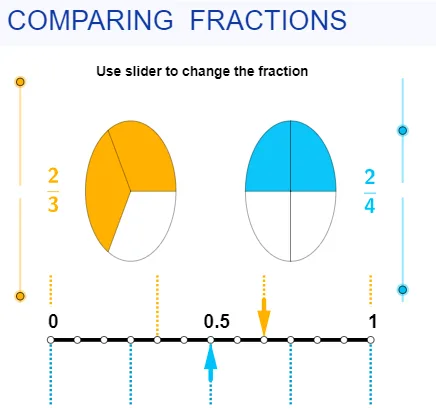
This example demonstrates how to compare two fractions using GeoGebra. Key mathematical concepts include fractions, ratios, and integers. Using commands like Sequence, CircleSector, Segment, and Vector, the example dynamically shows the comparison process. Suitable for upper elementary and middle school students.
GeoGebra Commands & Parameters
Sequence(((sqrt(2) * cos(((i * 360) * ° / den1))) + x(B), (sqrt(2) * sin(((i * 360) * ° / den1))) + y(B)), i, 1, den1) → leftptsSequence(((sqrt(2) * cos(((i * 360) * ° / den2))) + x(A), (sqrt(2) * sin(((i * 360) * ° / den2))) + y(A)), i, 1, den2) → rightptsSequence(Segment[B, Element[leftpts, i]], i, 1, den1) → segleftSequence(Segment[A, Element[rightpts, i]], i, 1, den2) → segrightCircleSector(B, Element[leftpts, den1], Element[leftpts, num1]) → eCircleSector(A, Element[rightpts, den2], Element[rightpts, num2]) → fSegment(D, C) → aVector(F, E) → uVector(G, H) → vSequence((-5 + (i * 10 / den1), 0), i, 0, den1) → list1Sequence((-5 + (i * 10 / den1), 1.3), i, 0, den1) → list2Sequence(Segment[Element[list1, i], Element[list2, i]], i, 1, den1 + 1) → list3Sequence((-5 + (i * 10 / den2), 0), i, 0, den2) → list4Sequence((-5 + (i * 10 / den2), -1.3), i, 0, den2) → list5Sequence(Segment[Element[list4, i], Element[list5, i]], i, 0, den2 + 1) → list6LCM(den1, den2) → bSequence((-5 + (i * 10 / b), 0), i, 0, b) → list7
AI Drawing Prompt Reference
Draw a visual comparison of two fractions. On the left, create a circle centered at a point, divided into equal sectors by radial segments, with one sector highlighted to represent the numerator. On the right, create another circle with a different number of equal sectors, also highlighting one sector. Below each circle, draw a horizontal number line with evenly spaced tick marks corresponding to each denominator. Between the two number lines, add arrows and segments to indicate the comparison. Additionally, draw a finer set of tick marks below, representing the least common multiple of the two denominators. Keep the layout symmetric to emphasize the size difference.
The prompt above was compiled from the original drawing commands and is for reference only.