
Orthocenter and Geometric Transformations
Loading the math board and drawing, please wait…
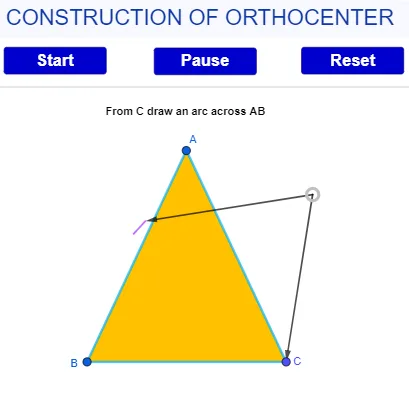
This example demonstrates the dynamic relationship between the orthocenter and geometric transformations in triangles. It involves core mathematical concepts such as orthocenter, similar triangles, geometric transformations, scatter plots, and expected value. The construction uses GeoGebra commands like Point, Rotate, Polygon, Slope, CircleArc, Intersect, Circle, Segment, Angle, If, Midpoint, LineBisector, Line, OrthogonalLine, and Vector. It is suitable for high school students and educators exploring geometric transformations and triangle properties.
GeoGebra Commands & Parameters
Point(xAxis) → BRotate(B, (-(40°)), C) → B'Polygon(A, B, C) → t1, c, a, bSlope(c) → m_4Rotate(B, (-γ), C) → C'_{2}CircleArc(C, C'_{2}, B') → rIntersect(r, c) → Q_1,Intersect(r, c, 1) → TCircle(T, u) → d_2Circle(C, a_1) → r_1Rotate(C, 40°, B) → C'Rotate(C, δ, B) → C'_{3}CircleArc(B, C', C'_{3}) → sIntersect(s, b) → R_1,Intersect(r_1, b, 1) → E_1Rotate(E_1, (-ι), C) → H_1Rotate(C, λ, R_1) → C'_{5}Circle(B, u) → c_1Intersect(c_1, c, 1) → RRotate(R, 40°, B) → R'Rotate(R, ε, B) → R'_{2}CircleArc(B, R', R'_{2}) → d_1Point(Circle[T, u]) → VRotate(W_1, (-η), T) → V'Rotate(W_1, (-(40°)), T) → T'CircleArc(T, V', T') → h_1Intersect(d_1, h_1, 1) → A_1Segment(C, A_1) → m_1Slope(m_1) → m_2Circle(T, u) → e_1Angle(C, B, C') → αAngle(B', C, B) → βRotate(B, (-(55°)), C) → B'_{1}Rotate(C, 58°, B) → C'_{1}If(17 ≥ d > 1, B, If[35 > d > 18, C'_{2}, B]) → DIf(17 ≥ d > 1, (i, 0), If[d > 35, C'_{3}, If[35 ≥ d > 17, C, (-2, 0)]]) → EMidpoint(D, E) → FLineBisector(D, E) → fCircle(F, 4) → eIntersect(e, f, 2) → GLine(G, D) → gLine(G, E) → hCircle(E, 1) → kCircle(D, 1) → pCircle(G, 0.6) → qIntersect(p, g, 1) → HIntersect(k, h, 1) → IIntersect(q, h) → O, PIntersect(q, g) → J, QIf(15.5 > o > 0, R, If[30 ≥ o ≥ 15.5, R'_{2}, If[o > 30, T, (-3.02484, 1.81287)]]) → LIf(30 ≥ o > 0, B, If[31 ≥ o > 30, V, If[o > 31, V', B]]) → KMidpoint(K, L) → MLineBisector(K, L) → mCircle(M, 4) → tIntersect(t, m, 2) → NRotate(R, 60°, B) → R'_{1}Segment(T, V) → g_1Angle(T', V, T) → ζIf(w > 60, C'_{5}, C) → SIf(60 ≥ w > 25, H_1, If[w > 60, R_1, E_1]) → ULineBisector(S, U) → i_1Midpoint(S, U) → WCircle(W, 4) → k_1Intersect(k_1, i_1, 2) → ZSegment(B_1, C) → n_1OrthogonalLine(B_1, n_1) → p_1Circle(B_1, 5) → q_1Intersect(q_1, p_1, 2) → F_1Rotate(E_1, (-(50°)), C) → G_1Angle(G_1, C, E_1) → θCircleArc(C, H_1, G_1) → s_1Rotate(C, 40°, R_1) → C'_{4}Angle(C, E_1, C'_{4}) → κCircleArc(R_1, C'_{4}, C'_{5}) → t_1Intersect(s_1, t_1, 1) → J_1Segment(B, J_1) → b_1Slope(b_1) → m_3OrthogonalLine(I_1, b_1) → f_2Circle(I_1, 5) → c_2Intersect(c_2, f_2, 2) → M_1Vector(G, D) → jVector(G, E) → lVector(N, K) → nVector(N, L) → f_1Vector(Z, U) → l_1Vector(Z, S) → j_1Segment(B, I_1) → g_2Intersect(n_1, g_2) → S_1Intersect(c, n_1) → T_1Intersect(g_2, b) → U_1Angle(S_1, T_1, Q_1) → μSegment(B, J_1) → h_2OrthogonalLine(U_1, b) → i_2Intersect(i_2, a) → V_1Angle(R_1, U_1, V_1) → νLine(Z_1, xAxis) → j_2
AI Drawing Prompt Reference
Draw a triangle ABC, then rotate point B around point C to get point B'. Next, draw the circumcircle c of triangle ABC and calculate its slope m_4. Through a series of rotations and intersections, construct several circles and segments, ultimately determining the orthocenter H_1 of triangle ABC. The process involves triangles, circles, segments, and geometric transformations.
The prompt above was compiled from the original drawing commands and is for reference only.