
Similar Triangles Inside a Right Triangle: Construction and Proof
Loading the math board and drawing, please wait…
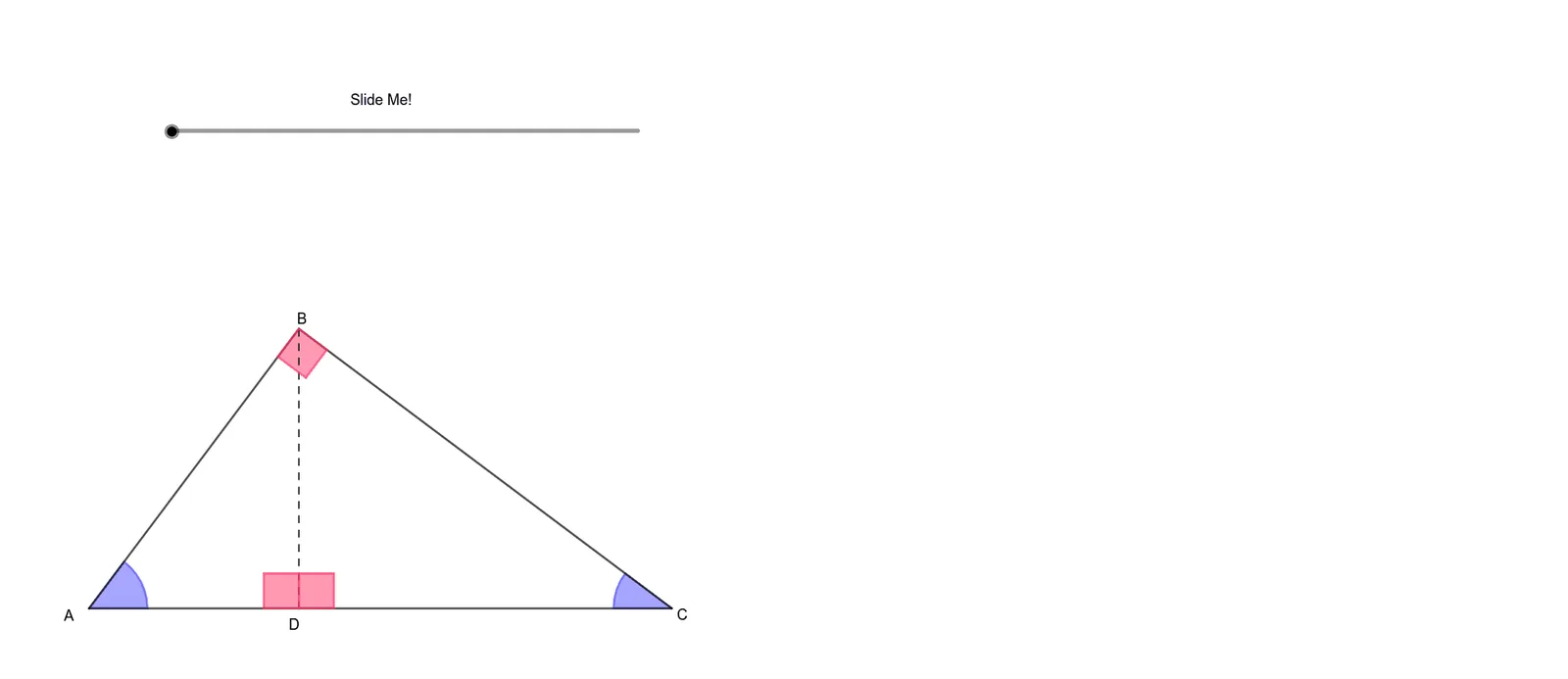
This example demonstrates how similar triangles arise inside a right triangle by adding auxiliary lines and tracking angle correspondences, then visually confirming that corresponding sides are proportional. The key math concepts are similar triangles (AA criterion and side-ratio properties), the angle structure of right triangles, and geometric construction using circles (via circle-based auxiliary arcs/sectors) together with perpendicular-line setup. Construction elements use GeoGebra commands reflected in the command list: Intersect to compute key points (e.g., A, B, C, D and their transformed counterparts), Circle and CircleSector to build circular auxiliary geometry, OrthogonalLine to impose right-angle constraints, Mirror and Dilate to generate symmetric and similarity-related configurations, Segment and Polygon to form and highlight the triangle/polygon regions, and Vector with Translate to encode directions and perform position updates consistently. The named transformed objects (A', C', D'', etc.) support following correspondences under transformations. Suitable for middle/high school geometry lessons on similarity, ratio proofs, and interactive construction; also useful for self-study and classroom demonstrations.
GeoGebra Commands & Parameters
Intersect(xAxis, yAxis) → APoint(xAxis) → BSegment(A, B) → gCircle(B, 4) → cCircle(A, 3) → dIntersect(d, c) → C, D_{1}, ,Segment(C, A) → fSegment(C, B) → hOrthogonalLine(C, g) → iIntersect(i, g) → DSegment(C, D) → jMirror(D, f) → D'Point(eq1) → GPoint(Circle[G, 3]) → MSegment(G, M) → mDilate(D, If[0 < a ≤ 1, 1 - a, 0], D') → HSegment(A, H) → kSegment(H, C) → lSegment(A, D) → nCircle(G, n) → rCircle(M, j) → sIntersect(r, s) → E, I, ,Dilate(D', If[1 < a ≤ 2, 2 - a, 0], E) → D''Dilate(A, If[1 < a ≤ 2, 2 - a, 0], G) → A'Dilate(C, If[1 < a ≤ 2, 2 - a, 0], M) → C'Segment(A', C') → qSegment(C', D'') → tSegment(D'', A') → bMirror(D, h) → NDilate(D, If[0 < a ≤ 1, 1 - a, 0], N) → D'_{1}Segment(C, D'_{1}) → eSegment(D'_{1}, B) → f_1Segment(D, B) → g_1Point(Circle[F, h]) → JSegment(F, J) → i_1Circle(J, g_1) → c_1Circle(F, j) → d_1Intersect(d_1, c_1) → K, L, ,Dilate(N, If[1 < a ≤ 2, 2 - a, 0], K) → N'Dilate(C, If[1 < a ≤ 2, 2 - a, 0], F) → C'_{1}Dilate(B, If[1 < a ≤ 2, 2 - a, 0], J) → B'Segment(N', C'_{1}) → j_1Segment(C'_{1}, B') → k_1Segment(B', N') → l_1Circle(A, 0.5) → e_1Intersect(e_1, g, 1) → OIntersect(e_1, f, 1) → PCircleSector(A, O, P) → p_1Dilate(A, If[0 < a ≤ 2, 2 - a, 0], G) → A'_{1}Vector(A, A'_{1}) → uTranslate(p_1, u) → q_1Dilate(B, If[0 ≤ a ≤ 2, 2 - a, 0], J) → B'_{1}Circle(B, 0.5) → r_1Intersect(r_1, h, 1) → QIntersect(r_1, g, 1) → RCircleSector(B, Q, R) → s_1Vector(B, B'_{1}) → vTranslate(s_1, v) → t_1Circle(D, 0.3) → c_2Intersect(c_2, j) → S,Intersect(c_2, g) → T, UOrthogonalLine(T, g) → m_1OrthogonalLine(S, j) → n_1Intersect(m_1, n_1) → VCircle(E, 0.3) → d_2Segment(E, M) → a_1Segment(E, G) → b_1Intersect(d_2, a_1) → W,Intersect(d_2, b_1) → Z,OrthogonalLine(Z, b_1) → f_2OrthogonalLine(W, a_1) → g_2Intersect(f_2, g_2) → A_1Dilate(D, If[0 < a ≤ 2, 2 - a, 0], E) → D'_{2}Dilate(S, If[0 < a ≤ 2, 2 - a, 0], W) → S'Dilate(T, If[0 < a ≤ 2, 2 - a, 0], Z) → T'Dilate(V, If[0 < a ≤ 2, 2 - a, 0], A_1) → V'Polygon(T', D'_{2}, S', V') → q1, t', d'_{2}, s', v'Polygon(D, S, V, T) → q2, d_3, s_2, v_1, t_2Circle(K, 0.3) → e_2Segment(K, J) → h_2Segment(K, F) → i_2Intersect(e_2, h_2) → B_1,Intersect(e_2, i_2) → C_1,OrthogonalLine(B_1, h_2) → j_2OrthogonalLine(C_1, i_2) → k_2Intersect(j_2, k_2) → E_1Dilate(D, If[0 < a ≤ 2, 2 - a, 0], K) → D'_{3}Dilate(S, If[0 < a ≤ 2, 2 - a, 0], C_1) → S'_{1}Point(Circle[S, 0.3]) → F_1Segment(S, F_1) → l_2Point(Circle[D, 0.3]) → G_1Segment(D, G_1) → m_2Dilate(G_1, If[0 < a ≤ 2, 2 - a, 0], B_1) → H_1Dilate(F_1, If[0 < a ≤ 2, 2 - a, 0], E_1) → I_1Polygon(S'_{1}, I_1, H_1, D'_{3}) → q3, s'_{1}, n_2, p_2, d'_{3}Polygon(D, G_1, F_1, S) → q4, d_4, q_2, r_2, s_3Circle(C, 0.3) → c_3Intersect(c_3, h) → J_1,Intersect(c_3, f) → K_1,OrthogonalLine(J_1, h) → a_2OrthogonalLine(K_1, f) → b_2Intersect(b_2, a_2) → L_1Polygon(C, K_1, L_1, J_1) → q5, c_4, f_3, g_3, h_3
AI Drawing Prompt Reference
Start with a right triangle on a coordinate plane, with the right angle at the origin and the base along the x-axis. Draw a perpendicular from the top vertex to the base, creating two smaller right triangles. Reflect the foot of this perpendicular across both legs to get symmetric points. Outside the triangle, choose a point and a point on a circle centered there; draw a segment and use its length as a radius for circles that intersect to define new points. Apply scaling transformations to create two similar triangles on either side, connecting corresponding vertices with segments. Finally, draw a small circular arc at the right-angle vertex to indicate the angle.
The prompt above was compiled from the original drawing commands and is for reference only.