
Comparing Apples and Oranges with Ratios: A Geometric Activity
Loading the math board and drawing, please wait…
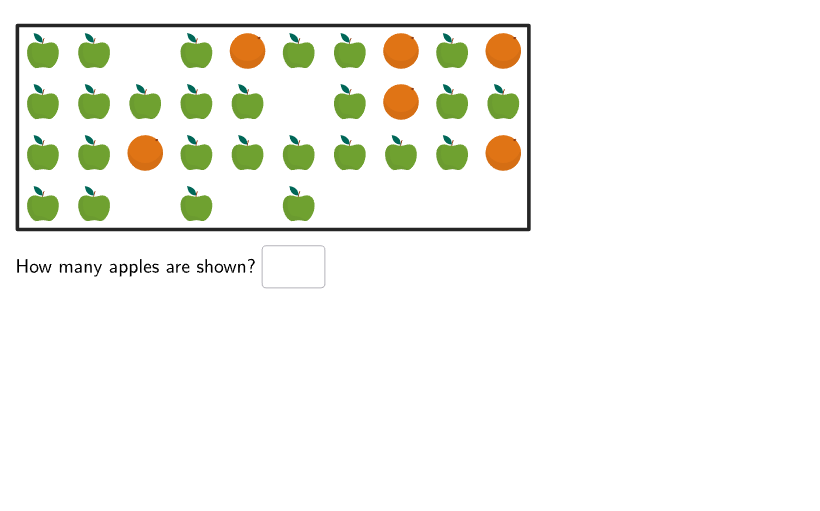
This activity demonstrates how to use GeoGebra to understand ratios through visual representation. It involves creating graphs of apples and oranges to compare quantities. The key math concepts are ratios and proportions. Construction uses commands like Shuffle, Element, and Sample. Suitable for grades 6-8 for classroom math lessons.
GeoGebra Commands & Parameters
Shuffle(Sequence[35]) → applesNums, {26, 19, 13, 33, 22, 2, 21, 15, 30, 7, 4, 23, 11, 24, 31, 32, 12, 1, 34, 9, 10, 18, 6, 28, 3, 8, 17, 5, 27, 20, 25, 14, 16, 35, 29}Element(applesNums, Mod[questionCount, Length[applesNums]] + 1) → applesShownShuffle(Sequence[36 - applesShown]) → orangesNums, {6, 1, 5, 4, 7, 3, 8, 9, 10, 2}Sample(Sequence[36], applesShown, false) → applesPos, {20, 17, 32, 36, 2, 4, 14, 24, 28, 25, 6, 1, 21, 22, 9, 19, 11, 31, 27, 12, 15, 13, 7, 29, 34, 26}Element(orangesNums, 1) → orangesShownSample(Sequence[36] \ applesPos, orangesShown, false) → orangesPos, {30, 23, 5, 8, 10, 18}Corner(5) → AppSizePolygon({(0, 0), (10, 0), (10, 4), (0, 4)}) → boxFlatten(Sequence[Sequence[(0.5 + kk, 4 - (0.5 + jj)), kk, 0, 9], jj, 0, 4]) → positionsSequence(Circle[Element[positions, Element[applesPos, kk]], 0.25], kk, 1, Length[positions]) → apples_{2}Sequence(Circle[Element[positions, Element[orangesPos, kk]], 0.25], kk, 1, Length[orangesPos]) → oranges_{2}Textfield(appsNum) → InputBox1Textfield(orangesNum) → InputBox2Textfield(totalNum) → InputBox3If(correct1, "✓", "✘") → textFeedback1If(correct2, "✓", "✘") → textFeedback2If(correct3, "✓", "✘") → textFeedback3Translate(hGL, Vector[(Vector[Corner[4], Corner[1]] / 500 * 16)]) → hGL'Translate(vGL, Vector[(Vector[Corner[1], Corner[2]] / 800 * 16)]) → vGL'Translate(vGL, Vector[(Vector[Corner[1], Corner[2]] / 800 * 64)]) → vGL'_{1}If(A1 ≟ 1, "Apple", "Apples") → B1If(A2 ≟ 1, "Orange", "Oranges") → B2Sequence((11.2, 4 - (0.5 + jj)), jj, 0, 2) → legendPosTranslate(legendPos, (1, 0)) → departureSequence((0.5, -2.6 + (kk * 0.75)), kk, 0, 1) → legendPos2Sequence((8.5, -2.7 + (kk * 0.75)), kk, 0, 1) → legendPos3Flatten(Translate[{legendPos2, legendPos3}, (If[stage ≟ 2, 4, 4.3], 0)]) → arrivalSemicircle(departure(1), arrival(4)) → c1Semicircle(departure(1), arrival(1)) → c2Point(c1, 1 - Min[SlideToAnim - 1, 1]) → Panim2Point(c2, 1 - Min[SlideToAnim, 1]) → Panim1Text(Text[applesShown], Panim1, true, true, 0, 0) → textanim1Text(Text[applesShown], Panim2, true, true, 0, 0) → textanim2Semicircle(departure(2), arrival(2)) → c3Semicircle(departure(2), arrival(3)) → c4Point(c3, 3 - Min[SlideToAnim, 3]) → Panim3Point(c4, 4 - Min[SlideToAnim, 4]) → Panim4Text(Text[orangesShown], Panim3, true, true, 0, 0) → textanim3Text(Text[orangesShown], Panim4, true, true, 0, 0) → textanim4Point(c1, 1 - Min[SlideToAnim, 1]) → Panim5Point(c3, 2 - Min[SlideToAnim, 2]) → Panim6Semicircle(departure(3), arrival(1)) → c7Semicircle(departure(3), arrival(3)) → c8Point(c7, 3 - Min[SlideToAnim, 3]) → Panim7Point(c8, 4 - Min[SlideToAnim, 4]) → Panim8Text(Text[applesShown], Panim5, true, true, 0, 0) → textanim5Text(Text[totalNum], Panim7, true, true, 0, 0) → textanim7Text(Text[totalNum], Panim8, true, true, 0, 0) → textanim8Text(Text[orangesShown], Panim6, true, true, 0, 0) → textanim6Dilate(pic1, 0.1) → pic1'Zip(Translate[pic1', Vector[positions(kk)]], kk, applesPos) → l1Translate(pic1', Vector[legendPos(1)]) → pic1''Translate(pic1', Vector[legendPos(3) - (sep, 0)]) → pic1''_{1}Translate(pic1', Vector[legendPos2(1)]) → pic1''_{2}Translate(pic1', Vector[legendPos3(2)]) → pic1''_{3}Dilate(pic2, 0.1) → pic2'Zip(Translate[pic2', Vector[positions(kk)]], kk, orangesPos) → l2Translate(pic2', Vector[legendPos(2)]) → pic2''Translate(pic2', Vector[legendPos(3) + (sep, 0)]) → pic2''_{1}Translate(pic2', Vector[legendPos2(2)]) → pic2''_{2}Translate(pic2', Vector[legendPos3(1)]) → pic2''_{3}Translate(pic2', Vector[legendPos2(2) + (0, 0.2)]) → pic2''_{4}Translate(pic1', Vector[legendPos2(1)] + ((-sep), 0.15)) → pic1''_{5}Translate(pic2', Vector[legendPos2(1)] + (sep, 0.1)) → pic2''_{5}Translate(pic1''_{5}, (8, 0)) → pic4Translate(pic2''_{5}, (8, 0)) → pic3TableText({((("\bold\color{" * colorApple) * "}") * Text[applesShown]), "Apples\\\\\\"}, {((("\bold\color{" * colorOrange) * "}") * Text[orangesShown]), "Oranges\\\\\\"}, {((("\bold\color{" * colorTotal) * "}") * Text[totalNum]), "Fruit"}, "l") → text5Translate(pic1', Vector[legendPos3(2) + (0, 0.3)]) → pic1''_{4}
AI Drawing Prompt Reference
Draw a graph showing the ratio between apples and oranges using coordinate geometry. First, randomly generate the number of apples, then the number of oranges. Next, plot the positions of apples and oranges on the coordinate plane, drawing a circle with radius 0.25 at each position. Finally, add text fields to display the number of apples and oranges, and provide feedback on the ratio.
The prompt above was compiled from the original drawing commands and is for reference only.