
Compare Eccentricity of Ellipses
Loading the math board and drawing, please wait…
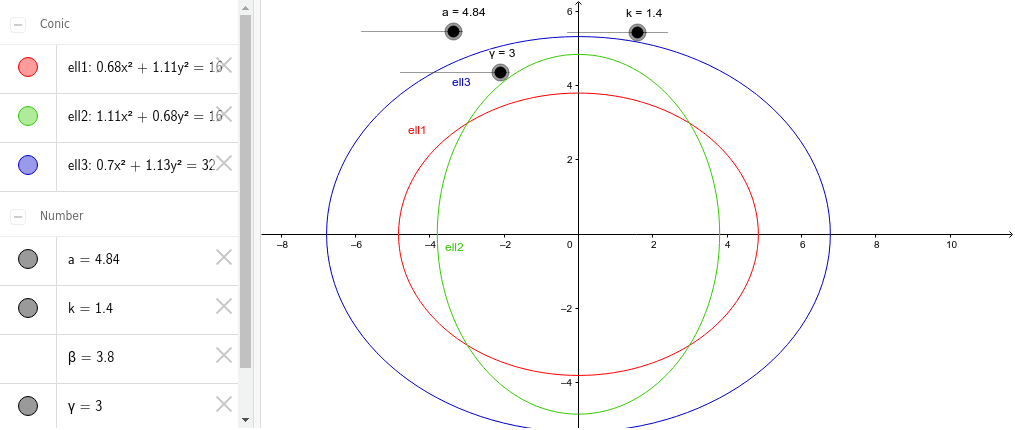
This example demonstrates how to compare the eccentricity of ellipses by adjusting their parameters. Eccentricity is a crucial parameter that describes the flatness of an ellipse. Using GeoGebra's ellipse objects and related commands, one can observe the changes in eccentricity. The core mathematical concepts involved include the definition of an ellipse, methods for calculating eccentricity, and how to alter the shape of an ellipse by adjusting parameters. Suitable for high school mathematics education, particularly in the context of coordinate geometry and conic sections.
GeoGebra Commands & Parameters
Numeric a(4.84)Numeric γ(3.0)sqrt(a^(2.0) - γ^(2.0))x^(2.0) / a^(2.0) + y^(2.0) / β^(2.0) = 1.0γ / ay^(2.0) / a^(2.0) + x^(2.0) / β^(2.0) = 1.0Numeric k(1.4)x^(2.0) / (k * a)^(2.0) + y^(2.0) / (k * β)^(2.0) = 1.0
AI Drawing Prompt Reference
Draw an ellipse and adjust its parameters to change its flatness, observing the eccentricity. First, set the semi-major axis to 4.84 and the eccentricity to 3, then calculate the semi-minor axis. Draw the standard ellipse, calculate the eccentricity, and then draw a similar but differently sized ellipse to observe the difference in flatness between the two ellipses.
The prompt above was compiled from the original drawing commands and is for reference only.