
Ellipse Conic Section Construction
Loading the math board and drawing, please wait…
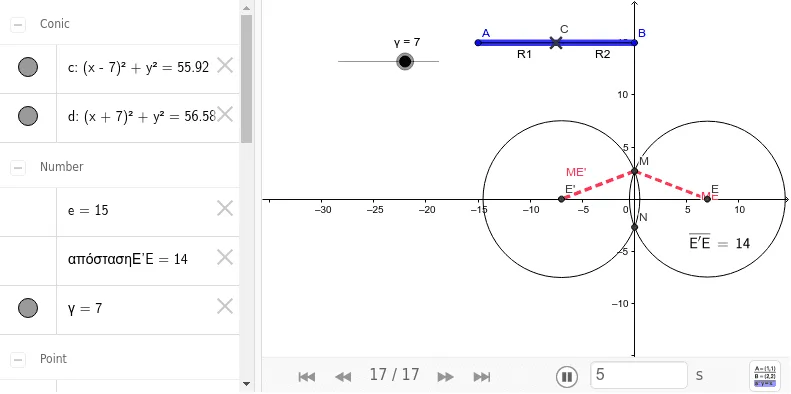
This example demonstrates how to construct a conic section of an ellipse using a secant line. Key math concepts include ellipse, secant line, square, integral calculus, and interest calculation. GeoGebra commands used in the construction are segment, point, circle, intersect, and distance. Suitable for high school students and teachers to understand coordinate geometry and integral concepts.
GeoGebra Commands & Parameters
Segment(A, B) → ABPoint(AB) → CSegment(A, C) → R1Segment(C, B) → R2Circle(E, R1) → cCircle(Ε', R2) → dIntersect(d, c) → M, N, ,Segment(M, Ε') → ME'Segment(M, E) → MEDistance(Ε', E) → απόστασηΕ'E
AI Drawing Prompt Reference
Draw a construction of an ellipse as a conic section. Start with a horizontal segment as the major axis, and place a point on it to divide it into two parts. Using the two endpoints of the segment as centers, draw two circles with radii equal to the two parts respectively. The circles intersect at two points, one above and one below. Connect one intersection point to both centers with line segments, and measure the distance between the two centers. The figure shows the ellipse and secant line relationship.
The prompt above was compiled from the original drawing commands and is for reference only.