
Commutative Property of Multiplication
Loading the math board and drawing, please wait…
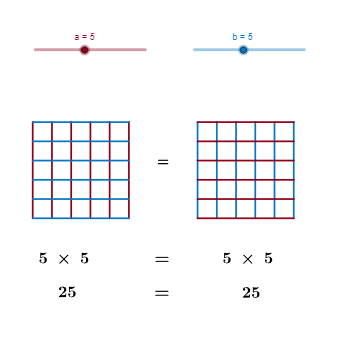
This example illustrates the commutative property of multiplication. Key mathematical concepts include multiplication. Construction highlights the use of `If` and `Sequence` commands to create geometric objects such as points, segments, and polygons. Suitable for upper elementary or middle school students to learn about multiplication properties.
GeoGebra Commands & Parameters
If(a < 4, 2, If[a < 7, 1.5, 1]) → AxIf(b < 4, 2, If[b < 7, 1.5, 1]) → AyIf(a < 4, 2, If[a < 7, 3.5, 5]) → daIf(b < 4, 2, If[b < 7, 3.5, 5]) → dbIf(da / a < db / b, da / a, db / b) → disIf(a < 4, 2, If[a < 7, 1.5, 1]) → BySequence(Segment[A + (j * (A2 - A) / a), A4 + (j * (A2 - A) / a)], j, 0, a) → list1Sequence(Segment[A + (j * (A4 - A) / b), A2 + (j * (A4 - A) / b)], j, 0, b) → list2Sequence(Segment[B + (j * (B2 - B) / b), B4 + (j * (B2 - B) / b)], j, 0, b) → list3Sequence(Segment[B + (j * (B4 - B) / a), B2 + (j * (B4 - B) / a)], j, 0, a) → list4Polygon(A, A2, A3, A4) → poly1, a_1, a2, a3, a4Polygon(B, B2, B3, B4) → poly2, b_1, b2, b3, b4
AI Drawing Prompt Reference
Draw two rectangles side by side, each divided into a grid by horizontal and vertical lines. The first rectangle has a certain number of columns and rows, while the second rectangle swaps the numbers of columns and rows, showing the same total number of small cells. The grid lines are evenly spaced, with spacing adjusted based on the dimensions. Each rectangle contains line segments connecting corresponding division points on opposite sides, forming a clear grid pattern. The two grids visually demonstrate that the product remains the same when factors are exchanged.
The prompt above was compiled from the original drawing commands and is for reference only.